Introduction
When 50 stores submit compliance checklists at the same time, spreadsheets break. When approvals touch four departments across three time zones, email chains collapse. Coordinating work across distributed teams and field locations is one of the harder operational problems organizations face today.
The scale of the problem is real. According to Asana's research, knowledge workers spend 60% of their time on coordination activities rather than the actual work they were hired to do — losing over 350 hours annually to unnecessary meetings, duplicated tasks, and status conversations.
That wasted time is exactly the problem workflow task management systems are built to solve. Across retail, banking, manufacturing, and logistics, these platforms connect task execution to accountability, compliance tracking, and real-time visibility — something spreadsheets and generic project tools aren't designed to handle at scale.
This post covers the top five workflow task management platforms in 2026, what makes each one stand out, and the key criteria to evaluate before committing to one.
Key Takeaways
- Workflow task management systems combine task assignment, process automation, and progress tracking into one platform, removing manual coordination gaps
- Top platforms in 2026: monday.com, ClickUp, Wooqer, Kissflow, and Asana — each suited to different team types and industries
- The right choice depends on your workforce type (desk vs. field) and whether your processes are project-based or recurring
- Multi-location teams running audits or field operations gain the most from mobile-first platforms with offline capability
- Evaluate tools on automation depth, integration ecosystem, mobile capability, and deployment speed — not just feature count
What Are Workflow Task Management Systems?
Workflow task management systems are software platforms that sequence, assign, automate, and track tasks across people, teams, and processes. The key distinction from basic to-do apps: these platforms embed process logic, enforce role-based ownership, and provide visibility across the full chain of work — not just individual items.
A checklist tells someone what to do. A workflow system ensures the right person does it, in the right order, with a completion record — and automatically routes exceptions to whoever needs to act on them next.
The market reflects growing enterprise reliance on these platforms. The global workflow management systems market was valued at USD 9.54 billion in 2022 and is projected to grow at a 33.3% CAGR through 2030, driven by adoption across BFSI, retail, manufacturing, logistics, and healthcare.
The five platforms below were selected based on feature depth, reliability, and fit for multi-location operations across these industries — the contexts where workflow management delivers the most measurable impact.
Top 5 Workflow Task Management Systems in 2026
These five platforms were shortlisted based on how well they serve real operational needs — not just feature checklists. Each was assessed across workflow automation depth, collaboration support, mobile access, integration ecosystem, and fit for both knowledge workers and distributed field teams.
monday.com
monday.com is a widely adopted work operating system used by mid-to-large enterprises across industries. Its visual interface makes it straightforward to build, automate, and track workflows across departments — without requiring technical expertise to configure.
The standout capability is its no-code automation builder paired with cross-board dashboards. Operations teams managing multi-step, multi-stakeholder processes can map out workflows visually, set trigger-based automations, and monitor progress across the entire organization from a single view.
| Criteria | Details |
|---|---|
| Best For | Enterprise teams needing visual workflow automation with high customization |
| Key Features | Kanban, Gantt, Timeline, and Calendar views; automation rules; 850+ integrations; workload management; AI workflow builder |
| Pricing | Free plan (2 seats); paid plans from $9/seat/month (Basic, billed annually); Enterprise pricing on request |
ClickUp
ClickUp positions itself as an all-in-one productivity and workflow platform — combining task management, documents, whiteboards, time tracking, and goal setting under one roof. It's popular with software, marketing, and operations teams that want to consolidate tools rather than manage multiple subscriptions.
The breadth is the selling point. Nested subtasks, custom workflow statuses, sprint management, collaborative docs, and ClickUp Brain AI are all available natively. Teams running four or five separate tools can typically replace them all with ClickUp — which is often reason enough to put it on the shortlist.
| Criteria | Details |
|---|---|
| Best For | Teams replacing multiple productivity apps with a unified task and workflow platform |
| Key Features | Custom workflow statuses, ClickUp Brain AI, sprint management, 1,000+ integrations, offline mode, collaborative docs |
| Pricing | Free plan available; Unlimited from $7/user/month; Business from $12/user/month (billed annually) |
Wooqer
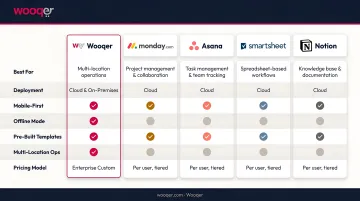
Wooqer is a mobile-first, AI-powered WorkApp platform built specifically for organizations managing distributed field teams and multi-location operations. It serves enterprises across retail, QSR, banking, manufacturing, logistics, and pharma — industries where the work happens on the floor, not at a desk.
Where general-purpose tools require adaptation to field contexts, Wooqer is designed for them from the ground up. Frontline teams submit audits, checklists, and compliance tasks via mobile — with GPS-tagged evidence, photo capture with annotations, and full offline capability that auto-syncs when connectivity returns.
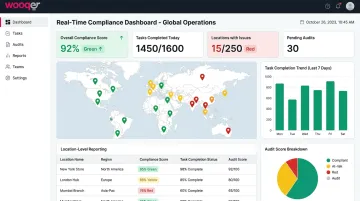
The AI-powered SensEye technology takes this further: it automatically validates visual merchandising and display compliance from photos submitted by store staff, eliminating the need for manual headquarters review. Lifestyle Stores used SensEye to improve VM compliance from 65% to 95% across 80+ locations, with implementation time dropping from weeks to hours.
The unlimited users pricing model and pre-built library of 1,000+ WorkApps across 20 industries means enterprises can scale across hundreds of locations without per-seat costs or lengthy implementation cycles. Results from other deployments reflect the same pattern:
- Axis Bank standardized operations across 4,500+ branches with real-time compliance tracking
- Chai Point achieved a 98% food safety score consistently across 180+ outlets
| Criteria | Details |
|---|---|
| Best For | Multi-location enterprises managing field audits, compliance checklists, SOP execution, and operational standards across distributed teams |
| Key Features | AI-Powered SensEye, customisable WorkApps, GPS + location tracking, photo capture with annotations, offline mode, auto-scoring, role-based access, real-time dashboards, corrective action tracking, unlimited team members |
| Pricing | Contact Wooqer for pricing; ready to deploy in minutes; works on any device |
Kissflow
For teams that need structured process governance without pulling in IT, Kissflow removes the dependency. Its low-code/no-code workflow designer lets HR, finance, and operations teams build, deploy, and manage process workflows on their own — no developer required.
The visual drag-and-drop builder, role-based access controls, external portal feature, and pre-built enterprise app templates are built for exactly this use case. One SoftBank IT manager documented building the application he needed in 30 minutes — which reflects how the platform is designed to work for internal process owners.
| Criteria | Details |
|---|---|
| Best For | Organizations that need structured business process automation without coding expertise |
| Key Features | Visual drag-and-drop workflow designer, pre-built enterprise templates, role-based access, KPI reporting, external portals, multi-department process management |
| Pricing | From $2,500/month (billed annually); free demo available |
Asana
Dependency management is where Asana pulls ahead of most general-purpose task tools. Teams running sequential workflows — where Task B cannot start until Task A is approved — get genuine value from its timeline views, automated rules, and smart reminders.
Asana is widely used by marketing, HR, operations, and cross-functional teams managing multi-phase work with hard deadlines. Asana AI, including AI Studio for building smart workflows, continues adding automation depth to what was already a strong structured-work platform.
| Criteria | Details |
|---|---|
| Best For | Teams managing structured project workflows with clear task dependencies and deadline accountability |
| Key Features | Timeline and Kanban views, task dependencies, Asana AI, 270+ integrations, automated rules, workload management, smart reminders |
| Pricing | Free plan (up to 2 users); Starter from $10.99/user/month (billed annually) |
How We Chose the Best Workflow Task Management Systems
The biggest mistake buyers make is choosing a tool based on brand recognition or feature count rather than fit with their actual workflow structure. A platform that suits a software team running sprints may be a poor fit for a retail operations team managing compliance across 300 stores.
Core Evaluation Criteria
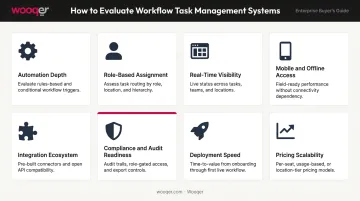
Tools were assessed on their ability to handle real operational workflows — not just task lists:
- Automation depth — trigger-based rules, approval routing, conditional logic, and AI-assisted task management
- Role-based task assignment — ensuring the right work reaches the right person automatically
- Real-time progress visibility — dashboards and reporting that surface issues without manual chasing
- Mobile and offline access — critical for any team that works outside an office
- Integration ecosystem — compatibility with ERP, HRIS, communication, and BI tools already in use
- Compliance and audit readiness — evidence capture, audit trails, and reporting for regulated industries
- Deployment speed — time from procurement to live operations across all locations
- Pricing scalability — cost model that doesn't penalise growth
Additional Criteria for Field-Based Operations
For teams operating across distributed sites, these eight criteria aren't sufficient on their own. Deloitte estimates 2.8 billion frontline workers globally, yet only 23% report having the technology needed to do their jobs productively — a gap that generic task tools rarely close.
Field and distributed teams should additionally assess:
- GPS-tagged task verification and location-level reporting
- Photo-based evidence capture with annotations
- Corrective action tracking from issue identification to closure
- True offline functionality — not just "limited offline mode"
General-purpose platforms can approximate some of these features through configuration. Platforms designed specifically for field operations include them as core functionality — which affects both reliability and time-to-value when deploying across dozens or hundreds of locations.
Conclusion
The right workflow task management system is the one that reflects how your teams actually operate — not how you wish they did. Desk-based project teams need Kanban views, sprint automation, and dependency tracking. Field teams need GPS-stamped task completion, photo evidence, and live compliance dashboards visible across every location simultaneously.
Move past demo-day impressions. Test tools against your specific workflow structure before committing. Ask:
- Is your workflow sequential or parallel?
- Are tasks project-based or recurring?
- Are your teams desk-based or field-based?
Then evaluate on scalability, adoption ease, and whether the tool can enforce operational standards without constant manual follow-up.
If your evaluation surfaces frontline teams, multi-location operations, or audit-heavy compliance requirements as core needs, those criteria point toward a different category of tool altogether. Wooqer is built specifically for that context — with WorkApps that deploy in minutes, GPS tracking, photo evidence capture, and real-time compliance dashboards that give every location visibility into the same operational standard.
Frequently Asked Questions
What is a workflow task management system?
It's software that combines task assignment, process sequencing, and progress tracking so work moves predictably from one step to the next. Unlike basic to-do tools, these platforms enforce role-based ownership, automate stage transitions, and provide visibility across the full team.
What are the four types of workflows?
Sequential (tasks completed in strict order), parallel (multiple tasks running simultaneously), state-machine (task movement governed by conditions or triggers), and rules-driven (branching logic determines next steps based on specific data inputs). Most enterprise workflows combine more than one type.
What are the key stages of a workflow?
Most workflows move through initiation, planning, task assignment, execution, review or approval, correction, and completion — though not every process requires every stage. The right platform automates transitions between them rather than relying on manual handoffs.
How is workflow management different from project management?
Project management focuses on planning and delivering time-bound, unique outcomes. Workflow management governs recurring, repeatable processes — store audits, approval chains, compliance checks. Most modern platforms blend both, but workflow tools prioritize standardization and process compliance over milestone tracking.
What features should I prioritize in a workflow task management system?
Prioritize task automation rules, role-based access controls, real-time dashboards, mobile and offline capability, integrations, and compliance or audit features. The right mix depends on whether your teams are desk-based or working in the field.
Can workflow management tools work for field teams and remote locations?
Most general-purpose platforms are designed for desk workers, so field-heavy organizations need to look specifically for mobile-first tools with GPS tracking, offline mode, photo capture, and location-level reporting. These capabilities are often absent from standard project management tools — test them directly before committing.
If your workflow management challenge lives on the floor rather than at a desk, Book a Demo to see how Wooqer handles recurring operational workflows across multi-location teams, or Try Wooqer and deploy a ready-to-use WorkApp for your most common field process today.