The demand for project management tools has surged accordingly. But here's the problem most teams run into: "free" rarely means what it implies. Many tools cap users at two seats, lock essential views behind paywalls, or restrict storage to a level that breaks down within weeks of real use.
This guide cuts through that noise. We've evaluated the best free project management tools available in 2026—covering what's actually included on each free plan, who each tool suits, and where the real limits kick in.
Key Takeaways
- Free PM software helps teams plan, assign, and track tasks at no cost—but free tiers vary wildly in what they actually let you do
- Trello and ClickUp are strong all-rounders; Asana fits small teams; Notion suits documentation-heavy workflows
- Jira is the go-to for dev teams managing sprints, bugs, and release cycles
- Monday.com is limited to 2 users on its free plan—better suited for solo use than team collaboration
- Field and multi-location teams (retail, QSR, logistics) need mobile-first tools with offline support and location visibility—not just Kanban boards
- Match the tool to your team's size, workflow type, and industry before committing
What Is Free Project Management Software?
Free project management software is a hosted platform that lets teams plan projects, assign tasks, set deadlines, and collaborate—without paying upfront. Most tools achieve this through a "free forever" tier with defined feature and capacity limits, rather than a time-limited trial.
This guide focuses exclusively on tools with genuinely usable free tiers—not 14-day trials dressed up as free plans.
One useful data point on why teams are looking: a 2025 Capterra survey of 2,545 global PM software buyers found that 55% cited adding AI capabilities as a top purchase trigger, while 71% ranked security as a top concern. Teams are clearly more deliberate about tool selection than they used to be.
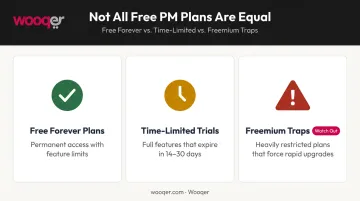
Before evaluating any tool, it helps to know which category its "free plan" actually falls into:
- Free forever plans — permanent access with feature/capacity limits (what this guide covers)
- Time-limited trials — full-featured access that expires, often 14–30 days
- Freemium traps — free plans so restricted they force an upgrade within days
Best Free Project Management Software & Tools in 2026
These tools were selected based on the generosity of their free plan, collaboration features, ease of use, scalability, and fit for different team types. All pricing listed below is in USD as published by each vendor.
Trello
Trello is one of the most recognisable visual PM tools available, built around Kanban boards with a drag-and-drop interface that teams can pick up in minutes. It works equally well for solo freelancers and small marketing teams managing campaign pipelines.
The free plan's standout feature is the Inbox—a dedicated space to capture tasks, ideas, and to-dos before triaging them to the right board. It's a genuinely useful addition for teams that deal with ad-hoc requests alongside planned work.
| Feature | Details |
|---|---|
| Free Plan Inclusions | 10 boards/workspace, unlimited cards, up to 10 collaborators, 250 automation runs/month |
| Best For | Visual, Kanban-style tracking for individuals and small teams |
| Paid Starting Price | $5/user/month (Standard plan) |
The 10-board cap and 250 monthly automation runs can feel restrictive quickly if your team manages multiple projects simultaneously.
ClickUp
ClickUp positions itself as an all-in-one workspace, and its free plan backs that claim more credibly than most. You get unlimited tasks, unlimited members, Kanban and calendar views, collaborative docs, and sprint management—all without paying.
The 60MB storage limit is the most significant constraint on the free tier. For teams sharing files frequently, this runs out fast. But for task coordination without heavy file attachments, ClickUp's free plan is among the most functional available.
| Feature | Details |
|---|---|
| Free Plan Inclusions | Unlimited tasks and users, Kanban and calendar views, collaborative docs, sprint management, 60MB storage |
| Best For | Teams needing multiple task views and custom workflow stages without paying |
| Paid Starting Price | $7/user/month (Unlimited plan) |
Time tracking on the free plan is limited to 100 basic and 40 advanced actions. Advanced reporting and Gantt views require an upgrade.
Asana
Asana's clean interface and shallow learning curve make it the default choice for non-technical teams getting structured about task management. It supports list, board, and calendar views alongside a "My Tasks" personal dashboard that helps individuals prioritize their own work alongside team projects.
The free Personal plan includes unlimited tasks, unlimited projects, 100+ integrations, and unlimited file storage (up to 100MB per file). Note: Asana's current official pricing page shows the free plan supports up to 2 users—teams larger than that will need to evaluate paid options.
| Feature | Details |
|---|---|
| Free Plan Inclusions | Unlimited tasks and projects, list/board/calendar views, 100+ integrations, unlimited storage (100MB per file) |
| Best For | Small teams or individuals needing clean task tracking with strong integration options |
| Paid Starting Price | $10.99/user/month (Starter plan) |
Monday.com
Monday.com's visually appealing, color-coded boards make it fast to understand and easy to adopt. The free plan includes 200+ templates and embedded docs, which helps teams get set up quickly for common use cases.
The limitation is significant, though: the free plan caps at 2 users and 3 boards. That makes it a solid option for solopreneurs or two-person teams, but it's not a realistic free option for most small teams.
| Feature | Details |
|---|---|
| Free Plan Inclusions | 2 seats, 3 boards, 200+ templates, embedded documents |
| Best For | Solopreneurs and pairs wanting a visually appealing, template-driven workflow |
| Paid Starting Price | $9/seat/month (Basic plan) |
Jira
Jira is the go-to choice for software development and agile teams. Built by Atlassian, it offers Scrum boards, sprint planning, backlog management, and native integrations with GitHub, GitLab, and other developer tooling.
For engineering and product teams, the free plan is genuinely strong: up to 10 users, backlog management, agile reports, and multiple views including board, timeline, and calendar. The 2GB storage limit is the main constraint.
| Feature | Details |
|---|---|
| Free Plan Inclusions | Up to 10 users, unlimited projects, backlog/board/timeline/calendar views, agile reporting, 2GB storage |
| Best For | Agile software development teams running sprints and tracking bugs or issues |
| Paid Starting Price | ~$8.15/user/month (Standard plan—verify current pricing at Atlassian's site before purchase) |
Notion
Notion sits at the intersection of documentation and project management. Teams can build custom databases, wikis, task boards, and linked pages within a single workspace, making it particularly well-suited to knowledge-driven work where tasks and documentation belong together.
The free plan gives unlimited pages and blocks for individual use. For teams with 2+ workspace owners, there's a 1,000-block limit per workspace, which can restrict collaborative use at scale. For smaller teams that want task tracking embedded in their documentation, Notion's free tier is unusually generous.
| Feature | Details |
|---|---|
| Free Plan Inclusions | Unlimited pages/blocks (solo), 1,000 blocks/workspace (2+ owners), databases, subtasks, dependencies, basic integrations |
| Best For | Teams combining documentation, knowledge management, and task tracking in one place |
| Paid Starting Price | $10/member/month (Plus plan) |
Wooqer
Every tool covered so far was built for desk-based or hybrid knowledge workers. Wooqer occupies a different category entirely: it's built for deskless, field-based, and multi-location operations teams.
Rather than Kanban boards and sprint backlogs, Wooqer delivers mobile-first WorkApps for digitising task checklists, compliance audits, SOPs, and inspections across locations. Field teams can complete WorkApps offline, with data auto-syncing when connectivity returns. GPS tracking, photo capture with annotations, and AI-powered visual verification via SensEye round out the operational toolkit.
The scale of adoption speaks to the use case: Wooqer manages 50,000+ locations across 450+ enterprise customers, with 1 million+ tasks completed daily. Clients include Domino's Pizza (1,500+ stores, 99% food safety compliance), Axis Bank (4,500+ branches), and Spencer's Retail (audit compliance up from 60% to 95% in 3 months).
| Feature | Details |
|---|---|
| Free Plan Inclusions | Unlimited team members, mobile-first WorkApps, real-time location status visibility, offline capability, works on any device |
| Best For | Field operations, multi-location businesses (retail, QSR, logistics, manufacturing) needing mobile task management and compliance tracking |
| Paid Starting Price | Contact Wooqer for pricing |
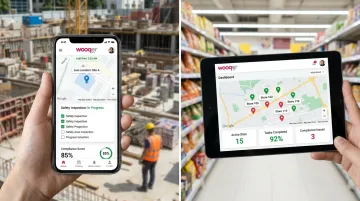
For teams in retail, QSR, or logistics, this is a fundamentally different tool than the others. It's purpose-built for operational execution in ways no general-purpose PM platform can replicate.
How We Chose the Best Free Project Management Software
The core evaluation question was simple: what can you actually do on the free plan before hitting a paywall?
Too many tools advertise "free" plans that break down within the first week: user seat caps kick in, storage fills fast, or the views your team actually needs sit behind an upgrade prompt.
Key limits to watch for when evaluating any free plan:
- Monday.com and Asana cap free plans at 2 users; Jira and Trello allow up to 10
- ClickUp's 60MB free storage fills fast; Jira's 2GB is considerably more workable
- Gantt and timeline views are rarely included on free tiers — most tools require an upgrade for these
- Trello caps automations at 250 runs/month on its free plan
- Notion's 1,000-block team workspace limit restricts collaborative use at scale
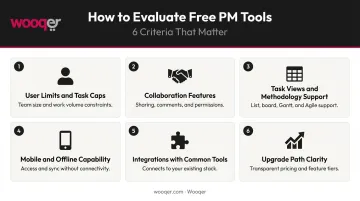
The six criteria used to evaluate each tool:
- Free plan user limits and project/task caps
- Collaboration and sharing features accessible without paying
- Available task views and methodology support
- Mobile accessibility and offline capability
- Integration with common tools (Slack, Google Workspace, GitHub)
- Clear upgrade path as team size or complexity grows
One final point: team type matters as much as feature count. Office-based teams, agile dev teams, and field operations teams have different requirements. A tool that's ideal for a 5-person marketing team will frustrate a 500-person retail operations network. The gap in needs is wider than most comparison guides acknowledge.
Conclusion
The best free project management tool is the one that fits how your team actually works—not the one with the longest feature list.
For most office-based teams, ClickUp offers the most genuinely usable free plan, with Trello close behind for visual, Kanban-focused workflows. Jira is the clear choice for dev teams running sprints. Notion suits teams where documentation and tasks live side by side. Monday.com and Asana are worth exploring for individuals and small pairs, but their free tiers are restrictive for collaborative team use.
The practical advice: shortlist 2–3 tools based on your team type, test them on real work (not demo data), and choose one with a paid tier you could realistically afford when you outgrow the free plan.
For teams managing operations across multiple physical locations—retail, logistics, QSR, or manufacturing—standard task lists often aren't enough. If you need compliance tracking, audit management, or real-time visibility across sites, explore how Wooqer's mobile-first WorkApps can digitize your field operations without building anything from scratch.
Frequently Asked Questions
What is the best free project management tool?
There's no single answer—it depends on your team's context. Trello and ClickUp are the strongest all-rounders; Jira leads for dev teams running agile sprints. For field or multi-location operations teams, Wooqer is a better fit than any general-purpose PM tool.
What are the limitations of free project management software?
Common restrictions include:
- User seat caps (Monday.com and Asana limit free plans to 2 users)
- Limited storage (ClickUp offers just 60MB on free tier)
- Locked views such as Gantt charts and workload planning
- Restricted automations and workflow rules
- Reduced or no customer support access
Is there a completely free project management tool with no time limit?
Yes. ClickUp, Asana, and Monday.com explicitly offer "free forever" plans. Trello, Jira, and Notion also have permanent free tiers, though all include feature or capacity limits compared to paid versions.
Can free project management tools support remote or multi-location teams?
Most tools support remote collaboration through shared boards, comments, and notifications. Teams spread across physical locations—retail stores, field sites, or branch networks—typically need mobile-first tools with offline support and GPS tracking, which general PM tools don't provide.
What features should I look for in free project management software?
Prioritize these when evaluating free tools:
- Unlimited tasks with no hard project cap
- Multiple view types: list, board, and calendar at minimum
- Team collaboration features — comments, assignments, and notifications
- A functional mobile app for on-the-go access
- Integrations with tools your team already uses
- A paid tier you can grow into without switching platforms
When should I upgrade from a free to a paid plan?
Upgrade when your team outgrows the free plan's user cap or storage. Other clear signals: you need Gantt or workload views, your automation requirements exceed free-tier limits, or your reporting needs more depth than the free plan provides.
If your team operates across physical locations and needs compliance tracking and real-time visibility beyond what any standard PM tool provides, Book a Demo to see how Wooqer handles field operations at scale, or Try Wooqer to get started with mobile-first WorkApps built for your industry.