Introduction
Managing training across dispersed teams has never been more complex. Whether you're overseeing 50 retail stores or 500 manufacturing plants, inconsistent training delivery, compliance gaps, and paper-based records create real operational risk — and real cost.
The global corporate e-learning market was valued at $104.32 billion in 2024 and is projected to reach $334.96 billion by 2030, growing at 21.7% annually. That growth reflects a fundamental shift: organizations aren't just moving training online — they're demanding platforms that track completion, enforce compliance, and deliver clear performance data across every location, in real time.
Choosing the right platform in that environment isn't straightforward. This guide covers the best training management software in 2026 — what each platform does well, where it falls short, and a practical framework for narrowing down your options.
Key Takeaways
- Training management software centralizes training creation, scheduling, delivery, tracking, and reporting — replacing spreadsheets and manual processes
- The best 2026 platforms combine scheduling, compliance management, and analytics with mobile-first design
- Evaluate platforms on ease of use, offline/mobile access, multi-location support, and reporting depth
- Top picks: Wooqer, TalentLMS, Docebo, iSpring Learn, and SafetyCulture
- Your choice depends on team size, delivery model, and whether compliance or content delivery is the primary use case
What Is Training Management Software?
Training management software (TMS) is a platform that centralizes how organizations create, schedule, deliver, track, and report on training programs across roles and locations.
The distinction from a traditional LMS matters here:
- LMS (Learning Management System) — focuses on content delivery and learner progress tracking
- TMS (Training Management System) — handles the operational layer: scheduling, compliance reporting, registration, and multi-location coordination
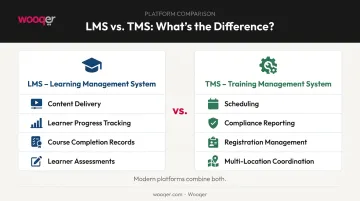
Modern platforms increasingly combine both functions.
42% of organizations globally cite training and upskilling as a top business challenge, yet many still rely on fragmented tools. According to Capterra's 2026 Buyer Insights Report, 34% of LMS buyers lacked any structured training system before their purchase, and 22% were still using manual methods.
The platforms reviewed below are evaluated on mobile capability, compliance support, ease of deployment, and fit for multi-location teams — the factors that separate a usable system from one that stalls in rollout.
Best Training Management Software in 2026
These tools were selected based on feature depth, ease of deployment, mobile-first capability, compliance support, and suitability for multi-location or field-based teams.
Wooqer
Wooqer is a mobile-first, AI-powered WorkApp platform built for organizations that need to standardize training, audits, and compliance across multiple locations and frontline teams. It's particularly strong in retail, QSR, logistics, manufacturing, and banking — sectors where field-based compliance isn't optional.
What sets Wooqer apart is the combination of pre-built, fully customizable WorkApps and its AI-powered SensEye technology, which surfaces real-time operational insights and flags compliance gaps before they become problems. The platform supports unlimited team members with no per-seat pricing, which makes it unusually cost-predictable at enterprise scale.
Training-specific WorkApps in Wooqer's marketplace deliver measurable results: the Compliance Training app reports 90% completion rates and 49% time saved across 14K+ users, while the Safety Training Log achieves 95% completion rates with 20K+ users. The platform serves 450+ enterprise customers across 50K+ locations.
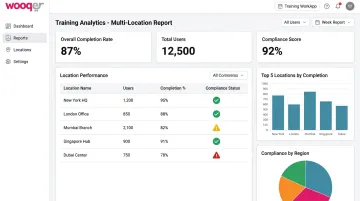
Wooqer holds a 4.8 rating on G2 and has earned G2 recognition for Fastest Implementation, Best ROI, and Easiest Admin — relevant credentials for organizations that can't afford a lengthy rollout.
| Category | Details |
|---|---|
| Key Features | Customizable WorkApps, AI-powered SensEye analytics, auto-scoring and grading, GPS and location tracking, offline capability, instant PDF reports, corrective action tracking, role-based access, calendar scheduling, automated notifications |
| Pricing | Custom/quote-based; annual license model with no per-user fees. Free trial and demo available at wooqer.com |
| Best For | Multi-location organizations, frontline/field workforce training, compliance-heavy industries (retail, QSR, manufacturing, pharma, logistics) |
TalentLMS
TalentLMS is a widely used LMS known for its clean interface and fast deployment. It's a strong choice for small-to-mid-sized businesses that need employee onboarding, compliance training, or skills development without heavy IT involvement.
The platform's gamification features — points, badges, leaderboards, and rewards — drive measurable engagement gains, particularly for desk-based teams. Its free tier supports up to 5 users and 10 courses, making it accessible for early-stage or budget-constrained organizations.
TalentLMS holds a 4.7 rating on Capterra across 596 reviews, based on consistent satisfaction scores for ease of use.
| Category | Details |
|---|---|
| Key Features | Course creation, attendee management, gamification (points, badges, leaderboards), reporting and analytics, mobile app (iOS/Android), offline-compatible course units |
| Pricing | Free plan (up to 5 users, 10 courses). Paid plans from Core at $119/month for up to 40 users, billed annually |
| Best For | SMBs seeking a simple, scalable LMS with fast setup and gamified learner engagement |
Docebo
Docebo is built for large-scale deployments that use AI to personalize learning pathways, recommend content, and identify skill gaps across the organization. It's trusted by large organizations that need multi-department visibility and deep integration with existing HR and CRM systems.
The platform supports social learning, user-generated content, and informal learning alongside structured compliance programs. Its integrations cover HRIS, CRM, e-commerce, and content authoring tools — making it a natural fit for enterprises with complex tech stacks. Docebo holds a 4.4 rating on Capterra across 235 reviews.
| Category | Details |
|---|---|
| Key Features | AI-powered content recommendations, personalized learning paths, social learning, detailed analytics, compliance tracking, HRIS/CRM integrations |
| Pricing | Custom pricing (Elevate and Enterprise tiers). Demo available; no self-service free trial confirmed |
| Best For | Large enterprises requiring AI-personalized learning, multi-department visibility, and deep HR system integration |
iSpring Learn
iSpring Learn is a structured learning platform well-suited for organizations that need consistent onboarding journeys and compliance training delivery. Its strength is simplicity: upload SCORM courses, build learning tracks, assign certifications, and track progress — all without needing a dedicated LMS administrator.
The mobile app works offline, with progress syncing automatically when connectivity returns — useful for teams in the field. iSpring Learn holds a 4.7 rating on Capterra across 192 reviews.
| Category | Details |
|---|---|
| Key Features | SCORM course upload (1.2 and 2004), unlimited file hosting, structured learning paths, attendance and progress tracking, certifications, mobile app (iOS/Android) with offline capability |
| Pricing | Pay-per-active-user model. Current pricing: approximately $4.46/user/month for 300 users, billed annually. 30-day free trial available |
| Best For | Growing businesses needing structured onboarding, consistent compliance training, and straightforward per-user pricing |
SafetyCulture
SafetyCulture started as a safety inspection platform and has grown into a comprehensive operational tool that combines training delivery with checklists, audits, and compliance tracking. For organizations in safety-critical industries, managing training and inspections from a single platform eliminates the coordination gap that leads to missed compliance events.
The Heads Up communication tool lets managers push updates and safety alerts to field teams directly through the app. Course completion dashboards give a clear view of who's completed what and when. SafetyCulture is rated 4.6 stars on G2 across 461 verified reviews.
| Category | Details |
|---|---|
| Key Features | Training content creation, checklist and inspection integration, action item management with due dates, Heads Up communication tool, course completion analytics, mobile app (iOS/Android) with offline capability |
| Pricing | Free plan for teams up to 10 users. Premium at $24/seat/month, billed annually ($29/month billed monthly) |
| Best For | Organizations combining training with operational checklists, audits, and safety compliance in one mobile platform |
How We Chose These Tools
The evaluation focused on four criteria relevant to operations and L&D teams in 2026:
- Mobile-first and offline accessibility — critical for field and frontline workers, not just desk-based employees
- Compliance and reporting depth: ability to track completion, generate audit-ready reports, and flag gaps
- Ease of deployment — can the platform go live without heavy IT dependency or months of configuration?
- Multi-location scalability: does the platform manage visibility and accountability across dozens or hundreds of sites?
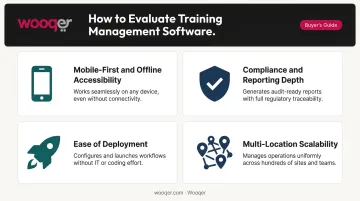
Capterra's 2026 LMS Buyer Insights Report found that buyers' top priorities are certification and compliance management (40%) and extended enterprise capabilities (40%) — validating the weight placed on these criteria here.
Those priorities also expose a common buyer mistake: selecting the most feature-rich platform available, then discovering it wasn't designed for their actual delivery model. For field-based workforces, a platform without offline capability or a strong mobile UX will see low adoption — regardless of how long its feature list is.
Beyond the four core criteria, the selection also weighed pricing transparency, third-party review ratings (G2, Capterra), and integration capability with HR and operational systems — factors that determine whether a platform works in practice, not just on paper.
Conclusion
The right training management software isn't the one with the longest feature list — it's the one that matches how your workforce actually operates. Field-based teams in compliance-heavy industries need different capabilities than desk-based corporate L&D teams.
Before committing to a platform:
- Identify your primary use case (onboarding, compliance, skills development, or operational training)
- Confirm whether your team is primarily mobile/field-based or desk-based
- Check offline capability if any workers operate in low-connectivity environments
- Request demos from your shortlist — the difference between platforms is clearest in the interface, not the feature matrix
If your shortlist includes tools for frontline or multi-location teams, Wooqer is worth evaluating. Its mobile-first WorkApps cover the criteria above directly: pre-built compliance training templates, offline capability, real-time completion visibility across sites, corrective action tracking, and flat pricing that doesn't penalize you for adding field workers. Book a demo to see how it handles your specific use case.
Frequently Asked Questions
What is the difference between a Training Management System (TMS) and a Learning Management System (LMS)?
A TMS handles the operational side of training — scheduling, compliance tracking, registration, and reporting across an organization. An LMS focuses on content delivery and learner progress. Many modern platforms, including several on this list, combine both functions in a single tool.
How much does training management software typically cost?
Pricing varies significantly. TalentLMS starts free (up to 5 users) and scales from $119/month (USD); iSpring Learn runs approximately $4.46/user/month at 300 users; SafetyCulture's Premium plan is $24/seat/month. Enterprise platforms like Docebo and Wooqer use custom pricing based on organizational scale.
What key features should I look for in training management software?
The essentials: automated notifications and tracking, compliance reporting, progress dashboards, and mobile accessibility. For field-based or frontline teams, offline capability matters — if the app doesn't work without a signal, your remote workforce won't use it.
Which training management software is best for large, multi-location organizations?
Wooqer (mobile-first, AI-powered, no per-user fees), Docebo (AI-personalized learning, enterprise analytics), and SafetyCulture (training plus operational checklists) are all strong options. The choice depends on whether the priority is field compliance management or corporate L&D delivery.
How long does it take to implement training management software?
Simpler platforms like TalentLMS and iSpring Learn can go live within days. Enterprise implementations — including data migration, configuration, and user training — typically run 4–12 weeks. Wooqer supports same-week go-live for multi-location deployments.
Can training management software work offline or on mobile devices?
Yes — leading platforms support this. Wooqer is built mobile-first with offline capability as a core feature. TalentLMS, iSpring Learn, and SafetyCulture all offer mobile apps with offline course completion and automatic sync when connectivity returns.
For organizations that need training to connect directly to measurable outcomes across field teams and multiple locations, Book a Demo to see how Wooqer delivers compliance training and operational tracking in one platform, or Try Wooqer and explore pre-built training WorkApps for your specific industry.