Introduction
Enterprises managing hundreds of workflows across distributed teams, locations, and departments face a compounding problem: manual approval chains, siloed systems, and inconsistent processes slow everything down. A regional manager waiting three days for a compliance report that should take three hours is a symptom, not the root cause.
Enterprise workflow automation software replaces those manual handoffs with rules-based triggers, conditional routing, and integrated system actions. The result: operations leaders gain real-time visibility across functions, cycle times drop, and error rates fall.
The scale of the opportunity is significant. McKinsey's 2025 research found that demonstrated technologies could automate activities accounting for roughly 57% of US work hours — a figure that reflects how much manual work most enterprises still run on.
That scale is also why platform choice matters. Not every tool handles the complexity of multi-location operations, deep integrations, or regulatory compliance. This article covers the 9 best platforms for 2026, evaluated on integration depth, compliance readiness, scalability, and mobile-first capability.
Key Takeaways
- Enterprise workflow automation replaces manual, repetitive tasks with rules-based and AI-driven processes across teams and locations
- The right platform integrates with ERP/CRM/HRMS stacks, enforces role-based access, and maintains audit trails for compliance
- Tools vary by specialty: RPA (UiPath, Automation Anywhere), ITSM (ServiceNow), field compliance (Wooqer), and no-code process design (Kissflow)
- Key selection criteria: scalability, mobile accessibility, integration ecosystem, security certifications, and ease of adoption for non-technical teams
- These 9 tools span IT, HR, field operations, supply chain, and cross-functional project management
What Is Enterprise Workflow Automation?
Enterprise workflow automation is the use of software to orchestrate, execute, and monitor multi-step business processes across teams and systems — replacing manual handoffs with trigger-based actions, conditional routing, and automated notifications at scale.
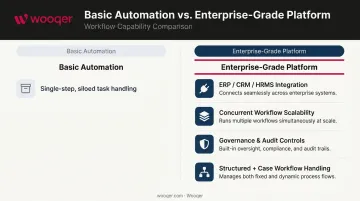
This is different from basic task automation. Enterprise-grade platforms:
- Integrate with ERP, CRM, HRMS, and field operations systems
- Support thousands of concurrent workflows without degradation
- Enforce governance through audit trails, role-based access, and compliance controls
- Handle both structured (process) and semi-structured (case) workflows
Each platform reviewed below was evaluated on integration depth, scalability, governance features, and real-world fit for industries like retail, banking, manufacturing, logistics, and healthcare.
9 Best Workflow Automation Software for Enterprises in 2026
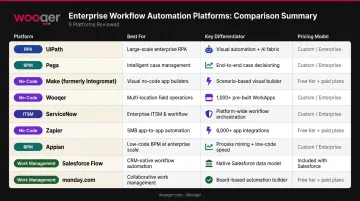
These 9 platforms were selected based on enterprise readiness, integration ecosystem, scalability, compliance capabilities, and industry applicability.
1. Wooqer
Wooqer is an AI-powered, mobile-first WorkApp platform built specifically for enterprises with distributed field operations. Organizations in retail, QSR, banking, manufacturing, and logistics use it to digitize audits, compliance checks, SOPs, and operational workflows across hundreds of locations — without needing a development team.
Unlike most workflow tools retrofitted for field use, Wooqer was built ground-up for frontline teams. Offline capability, GPS tracking, photo capture with annotations, and AI-powered visual compliance (SensEye) are core to its architecture, not afterthoughts.
Customer outcomes reflect that design focus. Axis Bank standardized operations across 4,500+ branches with a 60% cost reduction. Lifestyle Stores increased VM compliance from 65% to 95% and cut rollout time from weeks to hours. Chai Point achieved 98% food safety compliance and reduced quality incidents by 80%.
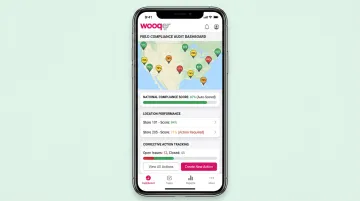
Platform stats: 450+ enterprise customers, 31 countries, 50,000+ locations, 1M+ daily tasks completed.
| Category | Details |
|---|---|
| Best For | Multi-location field operations, compliance audits, retail/QSR/manufacturing/banking |
| Key Features | Customizable WorkApps, offline mobile access, GPS tracking, photo capture with annotations, auto-scoring, corrective action tracking, role-based access, SensEye AI analytics |
| Security | ISO 27001, SOC 2 Type II, GDPR compliant, AES-256 encryption |
| Pricing | Custom enterprise pricing; unlimited team members, no per-seat fees |
2. Microsoft Power Automate
Part of the Microsoft Power Platform, Power Automate is among the most widely deployed enterprise automation tools globally — largely because it sits inside environments organizations already run. With deep native integration across Microsoft 365, Dynamics 365, and Azure, it removes the friction of connecting core business systems.
Its AI Builder module enables intelligent document processing and predictive automation without custom code. Microsoft reported 33M monthly active Power Platform users in 2024.
| Category | Details |
|---|---|
| Best For | Microsoft-ecosystem enterprises, cross-departmental automation, document processing |
| Key Features | AI Builder, cloud and desktop flows, approval workflows, RPA capabilities, extensive connector library |
| Pricing | Premium: USD 15/user/month; Process: USD 150/bot/month; Hosted Process: USD 215/bot/month (billed annually) |
3. ServiceNow
ServiceNow is the enterprise standard for IT service management (ITSM), HR automation, and customer workflow orchestration. Global enterprises rely on it to automate service requests, incident management, change approvals, and employee onboarding at scale.
The numbers from Forrester's Total Economic Impact study are hard to ignore: 20% IT productivity increase, 25% reduction in P1 incidents, USD 17.3M in present-value benefits, and 195% ROI. ServiceNow's FY2024 subscription revenue hit USD 10.646B, up 23% year-over-year.
| Category | Details |
|---|---|
| Best For | IT service management, HR operations, enterprise-wide service delivery automation |
| Key Features | Service catalogs, approval routing, AI-driven intelligent routing, SLA tracking, third-party integration spokes, analytics dashboards |
| Pricing | Custom enterprise quotes; contact ServiceNow for scoped packages |
4. UiPath
UiPath is the global leader in Robotic Process Automation, enabling enterprises to deploy software bots that handle high-volume, rule-based tasks — invoice processing, data entry, order management — by mimicking human interaction with applications.
Named a Leader in the 2025 Gartner Magic Quadrant for RPA for the seventh consecutive year, UiPath's visual workflow designer makes bot development accessible to non-developers. Its Process Mining capability identifies automation opportunities directly from process data. Uber projected USD 22M in savings from UiPath automation.
| Category | Details |
|---|---|
| Best For | High-volume RPA, legacy system automation, finance and supply chain task automation |
| Key Features | Visual process designer, AI Document Understanding, Process Mining, centralized Orchestrator, attended and unattended bots |
| Pricing | Pro and Enterprise plans available; Enterprise pricing is quote-based |
5. Pega Platform
Pega combines low-code BPM, AI-driven decisioning, and case management — a combination that serves banking, insurance, and healthcare well, where workflows involve multiple decision points and strict regulatory requirements.
Its Next-Best-Action AI engine allows workflows to adapt dynamically based on real-time data rather than static rules. Forrester named Pega a Leader in The Forrester Wave: Digital Process Automation Platforms, Q3 2025, with the highest scores in current offering and strategy.
| Category | Details |
|---|---|
| Best For | AI-driven case management, regulated industries (banking, insurance, healthcare) |
| Key Features | Low-code workflow designer, predictive analytics, case management, omnichannel engagement, decisioning AI |
| Pricing | Custom enterprise licensing; G2 user-reported estimates start around USD 8,500/year (non-official) |
6. Appian
Appian is a low-code BPM platform that connects workflow orchestration, data fabric, and AI in a single environment business users can actually operate. Its data fabric layer is the standout differentiator: it unifies data across ERP, CRM, and legacy databases without physically moving data — critical for enterprises where compliance and governance requirements make data migration risky.
Appian was named a Leader in both Gartner's Business Orchestration and Automation Technologies Magic Quadrant (Oct. 2025) and The Forrester Wave: Digital Process Automation Software, Q3 2025.
| Category | Details |
|---|---|
| Best For | Enterprise BPM, regulated process orchestration, low-code application development |
| Key Features | BPMN process modeler, data fabric layer, AI/ML integration, case management, audit trails |
| Pricing | Standard, Advanced, and Premium per-user/per-app tiers; Community Edition free; enterprise pricing via contact |
7. Kissflow
Kissflow is a cloud-based no-code platform that lets business teams build, run, and track workflows without IT involvement. Its drag-and-drop process builder and pre-built templates mean HR, finance, and operations teams can automate approval chains and onboarding in days rather than months.
Kissflow reports 1M+ users across 160 countries, with 50+ Fortune 500 companies in its customer base. 80% of customers stay five or more years — a retention rate that reflects genuine adoption rather than shelfware.
| Category | Details |
|---|---|
| Best For | No-code workflow automation for business teams, HR, finance, and operations |
| Key Features | Drag-and-drop process builder, form builder, real-time reporting, collaboration tools, pre-built templates |
| Pricing | Basic plan starts at USD 2,500/month; Enterprise tiers are custom-priced; no AI or API surcharges |
8. Automation Anywhere
Automation Anywhere combines enterprise RPA with cognitive AI to handle unstructured data — emails, PDFs, scanned documents — through its AI Document Automation capability. Its cloud-native architecture and Center of Excellence tools make it the preferred choice for large enterprises scaling bot programs across hundreds of deployments.
Automation Anywhere has held a Leader position in the Gartner Magic Quadrant for RPA for seven consecutive years — recognition that reflects consistent execution at enterprise scale, not just product capability.
| Category | Details |
|---|---|
| Best For | Intelligent bot automation, cognitive document processing, enterprise-scale RPA programs |
| Key Features | AI Document Automation, AARI AI agent, process analytics, cloud-native Orchestrator, strong security controls |
| Pricing | Custom enterprise quotes; contact Automation Anywhere sales |
9. monday.com (Enterprise Plan)
monday.com's Enterprise plan turns a popular work management platform into a serious workflow automation hub. Its AI-powered workflow generator lets teams describe a process in plain language and auto-build the workflow — useful for organizations that need quick deployment without a technical project.
The platform secures over 245,000 customers worldwide and reported 114% net dollar retention in FY2025 for customers with 10+ users. Its Trust Center cites ISO 27001, ISO 27018, SOC 2, and OWASP Top 10 compliance.
| Category | Details |
|---|---|
| Best For | Cross-functional workflow standardization, project and operations teams, scaling organizations |
| Key Features | Visual workflow builder, AI workflow generator, automated notifications, 200+ integrations, customizable dashboards, SSO and audit logs |
| Pricing | Enterprise plan is sales-led; contact monday.com for quotes |
How We Chose the Best Enterprise Workflow Automation Software
Feature checklists and analyst rankings only tell part of the story. The more useful question is whether a platform can actually serve your operational profile — distributed field teams, regional compliance mandates, and non-technical users included.
These 9 tools were evaluated on:
- Native connectors and API support for ERP, CRM, and HRMS systems (integration depth)
- Concurrent workflow capacity, user volume limits, and geographic expansion support
- SOC 2, GDPR, and ISO 27001 compliance, plus audit trail quality
- Usability for non-technical users and frontline teams without IT involvement
- Mobile access and offline capability for distributed field operations
- Real-time dashboards, reporting depth, and root cause analysis tools
- Vertical-specific functionality for industries like banking, retail, and manufacturing — not just generic automation
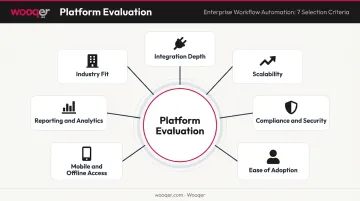
Each criterion was weighted against real enterprise deployment scenarios, not theoretical use cases. The tools that made this list performed well across all seven dimensions.
Conclusion
Choosing the right enterprise workflow automation software starts with understanding your operational profile. An enterprise with 500 distributed locations running compliance audits daily has fundamentally different requirements than one automating back-office IT ticketing or finance approvals. Matching the tool to the workflow type matters more than brand recognition.
Before committing to a platform, assess:
- Integration compatibility with your existing tech stack
- Scalability for your user volume and location count
- Total cost of ownership, including implementation and training
- Whether the platform serves the teams most burdened by manual work — including frontline and field operations teams, who are frequently overlooked in enterprise automation strategies
If your organization operates across multiple locations and needs real-time visibility into compliance, audits, and field SOPs, Wooqer is worth a close look. It's a mobile-first WorkApp platform built for multi-location enterprises across retail, QSR, banking, manufacturing, and logistics. Key capabilities include:
- Offline-ready mobile checklists and audits
- GPS tracking and location-level reporting
- Auto-scoring with instant PDF report generation
- Real-time visibility across every site or branch
Frequently Asked Questions
What is an enterprise workflow?
An enterprise workflow is a structured sequence of tasks, approvals, and information flows that spans multiple teams, departments, or systems within a large organization. It executes a business process consistently across the organization — common examples include invoice approvals, employee onboarding, or compliance audits across hundreds of locations.
What are the 4 stages of automation?
The four stages are: basic task automation (rule-based actions), process automation (multi-step orchestration), integration automation (connecting disparate systems), and intelligent/AI-driven automation (adaptive decision-making). Most enterprise platforms today operate across stages two through four simultaneously.
What is the difference between workflow automation and RPA?
Workflow automation orchestrates multi-step processes through predefined rules and system integrations. RPA (Robotic Process Automation) uses software bots to mimic human UI interactions — it's a technique embedded within broader automation platforms specifically for repetitive, high-volume tasks like data entry or document extraction.
How do enterprises choose the right workflow automation software?
Start by auditing processes with the highest manual burden and error risk. Evaluate platforms on integration compatibility, scalability, and compliance certifications — and prioritize tools non-technical users can operate independently, since low adoption is the leading cause of failed automation investments.
What features should enterprise workflow automation software have?
Must-have features include:
- Visual workflow builder with conditional logic and branching
- Role-based access controls and audit trails
- Native integrations with ERP, CRM, and HRMS systems
- AI-driven routing and real-time dashboards
- Mobile accessibility for distributed teams
Can workflow automation software support multi-location field operations?
Most general-purpose tools lack the features required for field operations. Platforms built for distributed environments — like Wooqer — offer offline capability, GPS tracking, photo capture, auto-scoring, and real-time compliance visibility across locations, capabilities that standard back-office automation tools typically don't include.
If your enterprise runs compliance audits, inspections, or field SOPs across multiple locations, Book a Demo to see Wooqer in action, or Try Wooqer and deploy your first WorkApp without involving IT.