The problem isn't usually a lack of intent. It's that manual, paper-based audit processes simply can't keep pace with multi-location operations. According to the NRF's National Retail Security Survey, retail shrink reached $112.1 billion in FY2022 — a figure that underscores how costly operational blind spots can be.
Retail audit software replaces clipboards and spreadsheets with mobile-first, real-time workflows. This guide covers what retail audit software actually does, the must-have features to look for, and a detailed comparison of five leading platforms — including features, pricing, and ideal use cases.
Key Takeaways
- Retail audit software digitizes store inspections, compliance checks, and corrective actions into one mobile-first workflow
- Key features to prioritize: offline capability, auto-scoring checklists, real-time dashboards, corrective action workflows, and GPS verification
- Top 5 tools compared: Wooqer, SafetyCulture (iAuditor), Bindy, GoAudits, and YOOBIC
- Pricing ranges from free tiers (SafetyCulture) to usage-based plans (Bindy) and unlimited-user models (Wooqer)
- Best fit depends on team size, location count, and whether you need a standalone audit tool or a full frontline ops platform
What Is Retail Audit Software?
Retail audit software is a digital tool that enables organizations to conduct structured inspections of their stores — covering brand standards compliance, visual merchandising, health and safety, loss prevention, and operational procedures. It replaces paper checklists and spreadsheets with standardized, mobile-first workflows that generate data teams can act on immediately.
These audits (also called store inspections or site visits) produce:
- Auto-scored checklists with instant performance grades
- Photo evidence with timestamps and annotations
- Corrective action assignments with owners and deadlines
- Trend reports showing compliance patterns across locations and time periods
The broader inspection management software market was valued at $5.61 billion in 2024 and is forecast to reach $13.26 billion by 2035 at an 8.13% CAGR — reflecting rapid adoption across multi-location operations in retail, hospitality, and manufacturing.
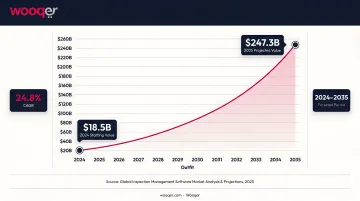
That growth is being driven by a clear operational need. For multi-location retailers, franchise operators, and regional managers, moving from manual processes to digital audit workflows means faster issue resolution, consistent store standards, real-time HQ visibility, and a documented compliance trail that paper simply can't provide.
Best Retail Audit Software: Top 5 Compared
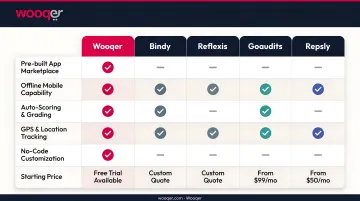
The five platforms below were evaluated on mobile functionality, checklist customisability, reporting depth, corrective action workflows, pricing transparency, and suitability for multi-location retail.
Wooqer
Wooqer is an AI-powered, mobile-first WorkApp platform purpose-built for digitising field operations and audits across retail chains. Its App Marketplace includes 55+ pre-built retail WorkApps — covering everything from weekly store audits to planogram compliance and visual merchandising checks — ready to deploy in minutes without IT involvement.
What sets Wooqer apart is its AI-powered SensEye technology, which automatically analyzes photos captured during audits and scores merchandising compliance without manual review. Lifestyle Stores, an 80+ location fashion retailer, used SensEye to reduce VM rollout time by 85% and lift VM compliance from 65% to 95% with same-day AI verification.
Spencer's Retail deployed Wooqer across 200+ stores in six weeks, achieving 95% audit compliance within three months — up from 60% — and cutting issue resolution time from two weeks to three days.
| Key Features | Customisable WorkApps, AI-powered SensEye visual verification, auto-scoring and grading, GPS and location tracking, photo capture with annotations, corrective action tracking, trend analytics dashboard, calendar scheduling, automated notifications, role-based access, instant PDF reports, offline capability |
| Pricing | Unlimited team members; custom pricing based on organizational needs — free trial available; contact Wooqer for current rates |
| Platforms | iOS (4.7★, 1,000+ reviews), Android (4.7★, 23,200+ reviews), web-based; offline capability included |
| Ratings | Capterra: 4.4 (69 reviews) · G2: 4.7 (46 reviews) |
SafetyCulture (iAuditor)
SafetyCulture is a globally used operations platform with one of the largest public template libraries available, covering retail, food safety, and loss prevention. It suits teams that need to digitize audits quickly across multiple locations without building checklists from scratch.
Key differentiators include:
- Conditional logic and mandatory media capture for structured audit flows
- "Actions" module for assigning and tracking corrective tasks
- Offline sync designed for stockrooms and areas with poor connectivity
- Optional IoT sensor integrations for continuous temperature and humidity monitoring
| Key Features | Large template library, conditional checklists, offline sync, instant PDF/web reports, Actions workflow, role-based dashboards, SafetyCulture Sensors (IoT), 60+ integrations |
| Pricing | Free for teams up to 10 users (5 active templates); Premium from $24/user/month billed annually; enterprise plans available |
| Platforms | iOS, Android, web-based |
| Ratings | Capterra: 4.6 (353 reviews) · G2: 4.6 (241 reviews) |
Bindy
Bindy is a cloud-based, AI-powered audit, task management, and communication platform built specifically for retail and hospitality networks. Its standout characteristic is usage-based pricing — teams pay by usage rather than per user, which keeps costs predictable as headcount scales.
Bindy mirrors retail field structures with an organizational hierarchy that matches how regional and district teams actually operate. It also includes project management tools (Gantt charts, task dependencies, milestones) alongside standard audit functionality, and according to Bindy, 92% of customers report saving time on site visits versus paper-based processes.
| Key Features | Usage-based pricing with unlimited users and locations, GPS/geo-fencing, project management tools, retail-specific templates, photo/video verification, task management, API and SSO, GDPR compliant, 22 languages |
| Pricing | Starter from $129/month (10 inspections); SMB at $499/month (70 inspections); Enterprise from $11,999/year; 14-day free trial, no credit card required |
| Platforms | iOS, Android, web (PC and laptop) |
| Ratings | Capterra: 4.9 (15 reviews) · G2: 4.5 (2 reviews) |
GoAudits
For smaller retail chains or teams new to digital auditing, GoAudits offers one of the most accessible entry points in the market. Starting at $10/user/month, it covers the core audit workflow without the overhead of enterprise platforms.
The platform includes a true offline mode with automatic sync on reconnection, retail-specific templates covering safety, merchandising, and loss prevention, and color-coded compliance dashboards with matrix reports and trend graphs to surface recurring gaps.
| Key Features | Drag-and-drop checklist builder, offline sync, time-stamped photo/video evidence, one-click PDF/web reports, role-based dashboards, compliance trend analytics, corrective task workflows, compliance tracking |
| Pricing | Starter from $10/user/month billed annually; 14-day free trial available; enterprise plans for larger teams |
| Platforms | iOS, Android, web-based |
| Ratings | Capterra: 4.8 (145 reviews) · G2: 4.5 (12 reviews) |
YOOBIC
Global retail brands juggling separate audit tools, chat platforms, and training systems will find YOOBIC worth a close look. It brings store audits, task management, team communications, and mobile micro-learning into a single platform — cutting the tool-switching that slows frontline teams down.
Dynamic audit forms include conditional questions and mandatory media capture. Built-in two-way chat and mobile micro-learning modules mean store teams can receive coaching and act on audit findings without leaving the platform — useful when compliance gaps need immediate follow-up training at store level.
| Key Features | Dynamic audit forms, action-plan tracking, real-time multi-level dashboards, offline mode, built-in chat, mobile micro-learning (AI-powered quizzes, gamified learning paths), unlimited media storage, white-glove onboarding |
| Pricing | Modular, quote-based pricing by locations or users depending on modules selected; contact vendor for current rates |
| Platforms | iOS, Android, web-based; cloud-hosted with multilingual support |
| Ratings | Capterra: 4.3 (68 reviews) · G2: 4.6 (164 reviews) |
Must-Have Features in Retail Audit Software
Not all inspection platforms are built for retail. Before committing to a tool, verify it covers these five capabilities.
Mobile + Offline Capability
Auditors regularly work in stockrooms, basements, and loading docks where connectivity is unreliable. The platform must support full offline data capture — checklists, photos, GPS — with automatic sync once a connection is restored. Mobile-first design matters too: field teams shouldn't need desktop access to complete an audit.
Customisable Checklists with Auto-Scoring
Retail audit types vary significantly — brand compliance, visual merchandising, loss prevention, and food safety each need different question sets. Look for:
- Custom checklist creation with conditional logic (show/hide questions based on prior answers)
- Mandatory photo capture for specific responses
- Auto-calculated scoring for instant performance grading without manual tallying
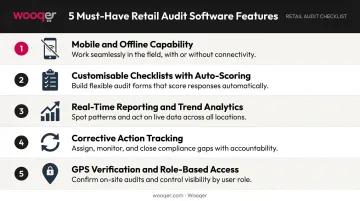
Real-Time Reporting and Trend Analytics
When audit reports auto-generate on completion, regional managers can act on findings immediately rather than waiting for manual compilation. Key capabilities to look for:
- Dashboards filterable by location, region, and time period
- Trend data that surfaces repeat compliance failures across stores
- Benchmarking tools to compare store performance across a portfolio
Corrective Action Tracking with Closed-Loop Workflows
An audit that doesn't trigger follow-through is just documentation. The platform should:
- Assign corrective tasks to named owners with deadlines
- Include escalation paths for overdue actions
- Allow photo-verified closure so auditors can confirm the fix happened
GPS Verification and Role-Based Access
GPS check-ins verify that auditors were physically present at the store — preventing falsified remote submissions. Role-based access ensures store managers see only their location's data, regional leads see their portfolio, and HQ has full visibility across the network.
How to Choose the Right Retail Audit Software
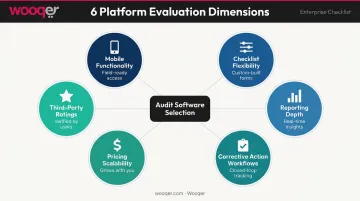
Not every audit platform is built for retail. Before shortlisting any tool, run it through these six dimensions to confirm it fits your operations — not just your budget.
What to Assess Before You Shortlist a Platform
Evaluate each platform across:
- Mobile functionality — iOS/Android support plus true offline mode
- Checklist flexibility — custom templates, conditional logic, auto-scoring
- Reporting depth — real-time dashboards, trend analytics, export options
- Corrective action workflows — task assignment, deadlines, escalation, closure verification
- Pricing scalability — per-user vs. usage-based vs. unlimited models at your current and projected scale
- Third-party ratings — Capterra and G2 reviews from verified retail users
Common Buying Mistakes to Avoid
- Brand-name enterprise platforms often lack retail-specific templates, organizational hierarchy matching, or merchandising workflows — name recognition isn't a substitute for fit
- Generic inspection tools built for construction or healthcare miss the multi-location role structures and retail checklists your teams actually need
- A platform that runs smoothly at 10 locations may require a full migration at 100 — verify that pricing, user management, and reporting scale without rebuilding
Match the Tool to Your Operational Scale
Once you've ruled out the wrong tools, use your scale and operational priorities to narrow the field. The table below maps common business profiles to the platform most likely to fit:
| Business Profile | Best Fit |
|---|---|
| Small chain, new to digital auditing | GoAudits — low entry cost, fast setup |
| Mid-size retail or hospitality network | Bindy — usage-based pricing, retail-specific |
| Large multi-location chain needing AI-powered audits | Wooqer — unlimited users, SensEye, 55+ retail apps |
| Global brand wanting IoT monitoring | SafetyCulture — sensors, 60+ integrations |
| Enterprise needing unified audits + training + comms | YOOBIC — modular all-in-one platform |
Conclusion
Retail audit software has moved well past checklist digitization. The best platforms today combine AI-powered verification, real-time compliance dashboards, closed-loop corrective action workflows, and role-based visibility — all on mobile devices that field teams already carry.
Before committing, trial your shortlisted platform with real field data. Run these three checks before signing off:
- Test offline functionality in a low-connectivity area to confirm no data loss
- Run a corrective action end-to-end — from assignment through to photo-verified closure
- Confirm the reporting surfaces insights your regional and HQ teams can act on, not just raw numbers
If you're looking for a platform that meets all three, Wooqer is worth a close look. Retail chains like Spencer's and Lifestyle Stores use it across hundreds of locations — leveraging SensEye visual AI, GPS tracking, and 55+ pre-built retail WorkApps to drive measurable compliance improvements. It runs on any mobile device, supports unlimited team members, and requires no IT setup to deploy. Explore Wooqer's retail audit WorkApps to see how quickly your team can get up and running.
Frequently Asked Questions
What is a sales audit in retail?
A sales audit reviews Point-of-Sale and Order Management System transaction data for accuracy. It validates cashier and store-day totals against calculated transaction totals, flags variances for correction, and maintains data integrity across downstream financial and merchandising systems.
What are the four types of retail audit?
The four main types are:
- Operational audits — evaluating store processes and efficiency
- Compliance audits — checking adherence to brand standards and safety regulations
- Financial/sales audits — verifying POS and transaction accuracy
- Merchandising audits — inspecting planogram adherence, product placement, and shelf availability
What is the difference between a retail audit and a store inspection?
A retail audit is typically a broader, structured review covering compliance, operations, and performance metrics across multiple dimensions. A store inspection is usually a focused, routine walkthrough of specific physical or operational elements. Most retail audit platforms, including Wooqer, support both use cases through customisable checklists.
What features should I look for in retail audit software?
Prioritize: mobile and offline functionality, customisable auto-scored checklists, real-time reporting and trend analytics, corrective action tracking with closed-loop workflows, GPS-verified check-ins, and role-based access. Choose platforms built specifically for retail over generic inspection tools.
Can retail audit software work without an internet connection?
Yes — Wooqer, SafetyCulture, Bindy, GoAudits, and YOOBIC all support full offline functionality. Auditors can complete checklists, capture photos, and record findings with no connectivity; data syncs automatically to the cloud once a connection is restored.
How does retail audit software improve compliance across multiple locations?
It standardizes the audit process with identical checklists across every location, surfaces real-time compliance scores for regional and HQ teams, and auto-assigns corrective actions to accountable owners. This eliminates the inconsistency that emerges when audits are managed manually or through spreadsheets.
If your retail network is ready to move from clipboards to consistent, data-driven audits, Book a Demo to see Wooqer's audit WorkApps in action across multi-location retail, or Try Wooqer and run your first digital audit without any setup overhead.