Introduction
Knowledge workers spend 60% of their time on "work about work" — approvals, status updates, duplicative data entry, and manual reporting — according to Asana's 2026 research. That's a structural problem, not just a productivity gap.
Traditional automation moved data between apps: if a form was submitted, send an email; if a row was added, notify Slack. That works for simple triggers, but AI workflow automation goes further. It reads unstructured data, classifies documents, flags compliance gaps, routes exceptions, and makes context-based decisions without rigid pre-programming.
For industries like retail, manufacturing, and banking managing operations across dozens or hundreds of locations, this distinction matters. The tools running compliance audits, field inspections, and multi-location checklists need more than triggers and actions — they need judgment.
This guide covers the 10 best AI workflow automation tools in 2026 — who each one is built for, what sets them apart, and how to match the right tool to your operational context.
Key Takeaways
- AI workflow automation handles multi-step processes across teams, apps, and locations by combining AI with rule-based logic — no constant human input needed.
- No single tool wins every use case. The best choice depends on technical skill, industry requirements, and integration needs.
- Wooqer is purpose-built for field operations and compliance; tools like Zapier, n8n, and Make serve broader automation needs.
- Credit-based and execution-based pricing models can scale costs unpredictably — budget for growth, not just entry price.
- Evaluate on long-term cost, AI depth, security, and deployment fit.
What Is AI Workflow Automation?
AI workflow automation uses AI-powered platforms to connect applications, trigger actions, process unstructured data, and make decisions — all without constant human intervention.
Traditional automation relies on fixed if/then logic: if a form is submitted, send a notification. That works for structured, predictable data. AI-powered automation handles what rule-based systems can't.
Instead of matching fields, it reads context: classifying email intent, detecting anomalies in audit scores, generating summaries from free-text responses, or routing a compliance exception based on situation rather than a rigid data field.
Real-world applications include:
- Compliance audits that auto-score responses and flag deviations
- Sales follow-ups triggered by email sentiment, not just form fills
- HR onboarding workflows that adapt based on role and location
- Field reporting that works offline and syncs when connectivity returns
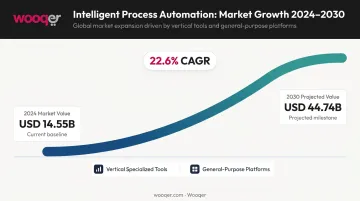
According to Grand View Research, the intelligent process automation market was valued at USD 14.55 billion in 2024 and is projected to reach USD 44.74 billion by 2030 — a 22.6% CAGR. That growth is being shaped by two distinct categories: specialized vertical tools built for specific industries, and general-purpose platforms that handle cross-functional automation at scale. The tools below represent the strongest options across both.
10 Best AI Workflow Automation Tools in 2026
These tools were selected based on AI capability depth, integration breadth, ease of use, pricing transparency, security, and scalability — covering use cases from field operations to developer workflows.
Wooqer
Wooqer is a mobile-first, AI-powered platform built specifically for digitizing field operations, compliance audits, and multi-location workflow management. It serves industries including retail, manufacturing, banking, logistics, pharmaceutical, and healthcare — with over 1,000+ ready WorkApps deployed across 450+ companies in 31 countries.
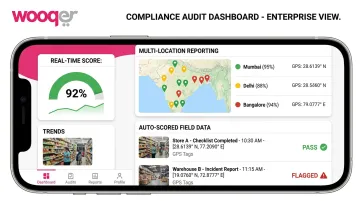
Where it differs from general automation tools: Wooqer replaces paper-based processes with customizable no-code WorkApps that work offline, capture GPS-tagged photos, auto-score audit responses, and push real-time compliance data to dashboards — without any manual data aggregation.
Its SensEye AI technology handles visual verification automatically. Documented results across customers include:
- Lifestyle Stores (80+ locations): VM implementation time cut from weeks to hours; compliance improved from 65% to 95%
- Spencer's Retail: Audit completion rates jumped from 60% to 98% within the first quarter
- Axis Bank: Operations standardized across 4,500+ branches with a reported 60% cost reduction
The platform uses a three-role model — Producers (workflow builders), Reviewers (area managers), and Store Teams (frontline users) — with granular access controls ensuring each role sees only relevant data. Wooqer holds SOC 2 Type II compliance, ISO 27001 certification, and GDPR compliance, making it viable for regulated sectors like banking and pharma.
| Details | |
|---|---|
| Best For | Multi-location operations, compliance auditing, retail/manufacturing/logistics/banking field teams |
| Key Features | SensEye AI visual verification, customizable WorkApps, offline mode, GPS tracking, auto-scoring, corrective action tracking, instant PDF reports |
| Pricing | Custom pricing — contact Wooqer for a demo |
n8n
n8n is a source-available, self-hostable workflow automation platform designed for technical teams who need maximum flexibility. It supports custom JavaScript and Python code steps alongside 400+ pre-configured integrations and thousands of community templates.
Its key differentiator is enterprise-grade security — SOC 2 compliance with annual independent audits, RBAC, and secret management via AWS, GCP, or Azure — combined with full self-hosting capability. For developers who won't run workflows through a third-party cloud, n8n is the strongest option.
| Details | |
|---|---|
| Best For | Technical teams needing self-hosted, deeply customizable AI automation |
| Key Features | JS/Python code steps, 400+ integrations, AI workflow builder, SOC 2, self-hosting |
| Pricing | Free (self-hosted); Cloud Starter from ~€20/month |
Zapier
Zapier is the most widely used no-code automation platform, now offering 9,000+ app integrations alongside AI steps, Zapier Agents, and MCP server support for more advanced use cases.
Its strength is accessibility. Non-technical teams can build multi-step automations across popular SaaS tools in minutes — no coding, no infrastructure setup. The "AI by Zapier" feature adds classification, summarization, and data extraction steps directly into workflows without requiring a separate AI account.
| Details | |
|---|---|
| Best For | Non-technical users automating tasks across popular SaaS apps |
| Key Features | 9,000+ integrations, AI steps, Zapier Agents, MCP support, templates |
| Pricing | Free (100 tasks/month); Professional from ~$19.99/month |
Make
Make (formerly Integromat) is a visual workflow automation tool known for powerful data transformation, granular routing logic, and multi-branch scenario building. With 3,000+ integration apps, it offers significantly more integration coverage than many competitors at a lower price point.
Make's visual debugger and Scenario Debugger give operations teams real visibility into what went wrong and when. Each module action counts as one credit — a transparent but volume-sensitive pricing model worth monitoring at scale.
| Details | |
|---|---|
| Best For | Ops teams building complex, multi-branch workflows with data transformation needs |
| Key Features | Visual scenario builder, granular routers/iterators, error handling, 3,000+ integrations |
| Pricing | Free (1,000 credits/month); Core from ~$12/month |
Microsoft Power Automate
Power Automate is the native automation layer within Microsoft 365 and Azure, combining cloud workflow automation with desktop RPA. AI Builder adds document processing, classification, entity extraction, and object detection directly into flows.
For Microsoft-standardized organizations, Teams, SharePoint, Dynamics, and Azure integrate natively — no connector configuration needed. Built-in governance controls and approval workflows come pre-configured for enterprise compliance requirements.
| Details | |
|---|---|
| Best For | Microsoft-centric organizations needing governance, approvals, and cloud + desktop automation |
| Key Features | M365/Azure integrations, AI Builder, desktop RPA, approval workflows, RBAC |
| Pricing | 30-day free trial; Premium from $15/user/month |
Workato
Workato is an enterprise iPaaS built for large organizations managing cross-departmental automations with strict governance requirements. It supports 1,200+ pre-built connectors and includes AIRO (its AI copilot for requirements analysis and process mapping), prebuilt agent templates, and Enterprise MCP functionality.
SOC 2 Type II certification, centralized governance dashboards, and audit-trail inheritance through Verified User Access make it a strong choice for regulated industries where IT teams manage mission-critical workflows at scale.
| Details | |
|---|---|
| Best For | Enterprise IT teams managing cross-departmental, mission-critical automations |
| Key Features | 1,200+ connectors, AIRO AI copilot, SOC 2 Type II, governance dashboards, Enterprise MCP |
| Pricing | Enterprise pricing — contact sales |
Gumloop
Gumloop is an AI-native, no-code automation platform built around a visual canvas with direct LLM access. Its "Gummie" AI assistant builds full workflows from plain-language descriptions, removing the need to manually wire logic. Premium LLM models are included — no separate API keys required.
Teams at Shopify, Instacart, and Webflow use Gumloop, and its all-inclusive credit pricing model avoids the surprise bills that can come from per-step or per-task models on other platforms.
| Details | |
|---|---|
| Best For | Marketing, sales, and operations teams wanting AI-native no-code automation |
| Key Features | Gummie AI assistant, built-in LLM access, MCP server, visual canvas, templates |
| Pricing | Free (5,000 credits/month); Pro from ~$37/month |
Lindy AI
Lindy AI is a lightweight automation platform focused on sales operations, customer support, and common business tasks. It offers a simple three-step setup process and supports voice-based AI agents for phone call handling — a differentiator few other tools on this list provide.
It fits best for straightforward use cases — email triage, CRM updates, healthcare note-taking — where fast configuration and low maintenance matter more than enterprise scalability. Its HIPAA-compliant medical scribe capability also reaches healthcare verticals that most automation tools don't serve.
| Details | |
|---|---|
| Best For | Sales and customer support teams automating lightweight, common business tasks |
| Key Features | AI voice agents, HIPAA-compliant healthcare notetaker, hundreds of integrations |
| Pricing | Paid tiers from ~$49/month |
ClickUp
ClickUp is a project management platform with a built-in automation engine that handles task assignments, status updates, notifications, and approvals using conditional logic. It connects to 1,000+ tools and includes ClickUp Brain for AI-assisted workflow management.
Its primary advantage is consolidation — teams that manage tasks, deadlines, and cross-functional processes can automate within the same platform they already use for project tracking, reducing the need for a separate automation tool entirely.
| Details | |
|---|---|
| Best For | Project and operations teams wanting task management and automation in one platform |
| Key Features | ClickUp Brain, automations engine, 1,000+ integrations, audit logs, email automation |
| Pricing | Free plan; Unlimited from $7/user/month |
Monday.com
Monday.com is a work management platform with a dedicated AI Workflows module supporting multi-step, cross-board processes with up to 200 AI-powered blocks. Its natural-language workflow generator builds entire workflows from a plain-language description — one of the clearest verified examples of AI-native workflow generation among work management tools.
Best suited for cross-functional teams standardizing repeatable processes across departments — HR onboarding, marketing campaign management, or operational checklists — with real-time visibility baked in.
| Details | |
|---|---|
| Best For | Cross-functional teams standardizing repeatable business processes |
| Key Features | AI workflow generator, real-time insights, automated notifications, 200+ integrations |
| Pricing | Free plan; Basic from $9/seat/month |
How We Chose These Tools
These tools were shortlisted against five criteria:
- AI capability depth — native AI vs. bolted-on integrations
- Integration breadth — compatibility with existing tools and stacks
- Ease of use — for both technical and non-technical teams
- Pricing transparency — including how costs scale with usage volume
- Security and compliance — features relevant to enterprise buyers
Common Buying Mistakes
These criteria matter because the buying process itself is where most teams go wrong. Gartner predicted that at least 30% of GenAI projects would be abandoned after proof of concept by end-2025 — citing poor data quality, inadequate risk controls, escalating costs, and unclear business value. Several failure patterns repeat across automation tool purchases:
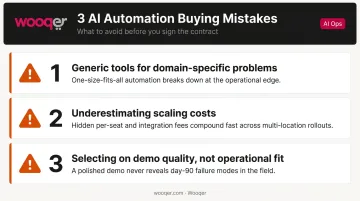
- Generic tools for domain-specific problems — a retail operations team running compliance audits across 50 locations has very different needs than a marketing team automating email follow-ups. A repurposed general tool rarely handles offline submissions, audit exceptions, or cross-location reporting well.
- Underestimating scaling costs — Make's credit model, Zapier's task limits, and n8n's execution tiers behave differently at volume. A workflow costing $12/month at low usage can hit $120/month as it grows.
- Selecting on demo quality, not operational fit — the question isn't whether the tool looks impressive; it's whether it handles your specific failure modes.
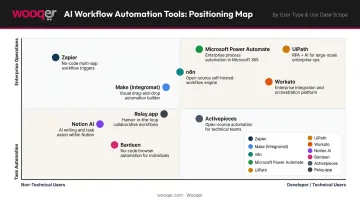
The right tool matches four things: your team's technical skill level, your industry's compliance requirements, your integration stack, and your deployment preference — cloud, self-hosted, or mobile-first.
Conclusion
The most common mistake in AI workflow automation is treating it as a technology decision rather than an operational one. Start by asking which tool fits how your team actually works — not which one has the most buzz.
The right fit depends on your context:
- Developers building complex data pipelines need n8n's code flexibility
- Small marketing teams need Zapier's breadth and quick setup
- Enterprise IT managing cross-departmental flows need Workato's governance layer
- Operations teams running compliance audits across dozens of locations need a tool built for that context, not one adapted to it
Look beyond the entry price and compare total cost of ownership. Credit-based, task-based, and per-user models behave very differently at scale. On AI capabilities, ask the harder question: does the AI actually handle your exceptions in production, or does it only help you build the workflow once?
If your team manages field operations, compliance audits, or multi-location inspections, Wooqer's WorkApps are built specifically for that use case — not a general platform stretched to fit. Book a demo to see how it works in your environment.
Frequently Asked Questions
What is the difference between traditional workflow automation and AI workflow automation?
Traditional automation moves data between apps using fixed if/then rules — submit a form, send an email. AI workflow automation adds intelligence: tools can interpret unstructured data, classify documents, detect anomalies, and route exceptions based on context rather than rigid logic. The difference matters most when workflows involve human judgment calls or variable inputs.
Which AI workflow automation tool is best for field operations and multi-location teams?
Purpose-built tools like Wooqer are designed for this use case, offering mobile-first design, offline capability, GPS tracking, and pre-built compliance audit workflows across retail, banking, logistics, and manufacturing. General tools like Zapier or Make are better suited for office-based SaaS task automation where connectivity isn't a factor.
Can AI workflow automation tools work on mobile devices or offline?
Most general-purpose tools (Zapier, n8n, Make) are web-based with limited mobile support and no offline mode. Specialized platforms like Wooqer are built mobile-first with offline capability — essential for field teams running audits in warehouses, store floors, or remote sites.
What should I look for when evaluating AI workflow automation tools in 2026?
Prioritize AI-native capabilities built into the core product, not added on after the fact. Then evaluate integration depth, pricing transparency at scale (per-execution, per-step, or per-user), security certifications (SOC 2, ISO 27001, RBAC), and deployment fit — cloud, self-hosted, or mobile-first — based on where your team actually operates.
How much do AI workflow automation tools typically cost in 2026?
Free tiers exist for Zapier, Make, Monday.com, ClickUp, and Gumloop. Mid-tier plans range from $7–$50/month. Enterprise platforms like Workato require custom contracts. Watch for credit-based and task-based pricing — these models scale unpredictably as workflow complexity and volume increase.
Are AI workflow automation tools suitable for non-technical users?
Yes. Zapier, Monday.com, Gumloop, ClickUp, and Wooqer are all designed for non-technical users with no-code builders and AI assistants. n8n is the exception — it's better suited for developers who want code-level control and self-hosting.
If field operations, compliance audits, or multi-location inspections are part of your automation agenda, Book a Demo to see exactly how Wooqer handles those use cases, or Try Wooqer to get your team up and running quickly.