Introduction
Managing operations across multiple locations has always been hard. Managing them well — consistently, at scale, with paper checklists and disconnected systems — is close to impossible.
Teams in retail, manufacturing, logistics, and banking face the same compounding problem: manual processes create errors, errors create compliance gaps, and compliance gaps create costs. According to Ardent Partners' 2024 AP benchmark, the average invoice processing cost sits at $9.87 with a 10.1-day cycle time — while best-in-class teams process the same invoices at $2.81. That gap exists across every manual process in your operation, not just accounts payable.
This guide gives operations leaders a practical path forward: clear definitions, the four types of automation, measurable benefits, the four implementation stages, and a framework for choosing the right platform at your scale.
Key Takeaways
- Operations automation replaces manual, repetitive workflows with software-driven execution across scheduling, compliance, and reporting.
- Four automation types — RPA, workflow automation, AI-powered automation, and hyperautomation — each serve different complexity levels and use cases.
- Implementation follows four stages: discovery, prioritization, pilot deployment, and continuous optimization.
- Target high-frequency, error-prone, paper-based processes first — these deliver the fastest ROI.
- Mobile-first, no-code platforms with multi-location support deliver the fastest time to value.
What Is Automation in Operations Management?
Automation in operations management is the use of technology and software to execute, monitor, and optimise operational workflows — including scheduling, quality checks, compliance tracking, resource allocation, and reporting — with minimal manual intervention.
Gartner defines business process automation tools as software that enables the design, execution, and monitoring of business processes involving diverse systems and humans. That definition captures the scope well.
How It Differs from General Business Automation
General business automation covers a wide range — marketing, sales, HR, finance. Operations automation is narrower and more specific: it targets the systems that keep day-to-day functions running consistently across teams, sites, and processes.
The distinction matters because operations automation has to work across:
- Multiple physical locations with different teams
- Regulatory compliance requirements that vary by region or industry
- Real-time performance standards that can't wait for end-of-day reports
- Field workers who may not have reliable internet access
Why It's No Longer Optional
IDC projected worldwide intelligent process automation software will reach $65.3B by 2027 at a 21.7% CAGR. By 2025, 60% of enterprises were expected to mandate business-outcome-based automation strategies. Organizations that delay accumulate structural cost disadvantages that widen each year — making late adoption progressively more expensive to reverse.
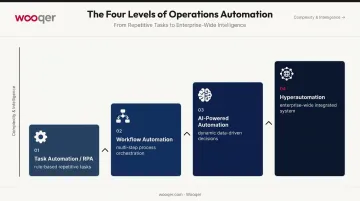
4 Types of Automation in Operations Management
Most organizations start at task-level automation and mature over time. The four types represent a progression from simple, rule-based automation to enterprise-wide intelligent systems.
Task Automation (RPA)
Robotic Process Automation automates individual, rule-based, repetitive tasks: data entry, report generation, invoice processing, and form submissions. RPA works best when tasks are high-volume, structured, and require no judgment.
The results can be substantial. Forrester's Total Economic Impact study of the UiPath platform found a composite organization saved 25,000 hours in year one, scaling to 225,000 hours by year three — with 97% ROI and payback in under six months.
Common RPA applications in operations:
- Invoice and purchase order processing
- Customer record migration
- Compliance watchlist checks
- Automated status reporting
Workflow and Process Automation
Where RPA handles individual tasks, workflow automation orchestrates multi-step processes across teams. Think employee onboarding sequences, purchase approval chains, or compliance audit workflows — each step automatically triggers the next, eliminating manual hand-offs.
Forrester's 2024 Microsoft Power Automate TEI composite reported 248% ROI and $39.85M NPV with payback under six months, modelled on a 30,000-employee organization running workflows across inventory management, ticket processing, and legacy file migration.
Intelligent / AI-Powered Automation
AI-powered automation goes beyond rule-following. These systems learn from data and make dynamic decisions: demand forecasting, predictive maintenance alerts, anomaly detection in quality checks, and smart resource allocation.
The operational impact is measurable:
- McKinsey reports AI in distribution can reduce inventory levels by 20–30% through improved demand forecasting
- Gen AI maintenance tools can reduce unscheduled downtime by up to 90% and cut maintenance labor costs by about one-third
Wooqer's SensEye technology applies this capability to visual merchandising and compliance — automatically scoring submitted photos against established standards, delivering same-day verification without manual review. Lifestyle Stores used SensEye to achieve 85% faster VM rollout and increased compliance from 65% to 95% across 80+ stores.
Hyperautomation
Hyperautomation integrates multiple automation technologies (RPA, AI, machine learning, and workflow tools) into a unified, organization-wide system. The goal is to automate as many end-to-end processes as possible, reducing human touchpoints across the entire operation.
Gartner forecasts the hyperautomation enablement software market will reach $1.07T by 2028 at a 13.9% CAGR. Think of it less as a product category and more as a strategic posture: treating automation as an ongoing enterprise program rather than a series of one-off tool deployments.
Key Benefits of Automating Operations Management
The benefits of automation compound across every function it touches. Organizations that automate consistently outpace those relying on manual processes — on efficiency, compliance, retention, and competitive responsiveness.
Efficiency and Cost Reduction
Eliminating manual coordination cuts labor hours across scheduling, reporting, and data entry. The Ardent Partners benchmark quantifies one dimension clearly: best-in-class AP teams process invoices at $2.81 versus the $9.87 industry average — a 72% cost reduction from process standardization alone. That ratio applies across operations functions.
Accuracy and Standardization
Human error concentrates in high-frequency, repetitive tasks. Automated workflows produce consistent outputs regardless of who is on shift or which location executes the process.
Ardent Partners reports that best-in-class AP teams have an invoice exception rate of 11.1% — 60% lower than peers — driven by standardized digital workflows. That improvement in exception rates translates directly to compliance documentation, quality scoring, and inventory tracking — anywhere manual inputs introduce variability.
Real-Time Visibility Across Locations
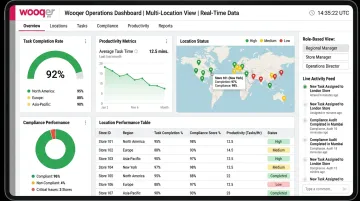
Automated data collection replaces end-of-day manual submissions with live dashboards showing process status, completion rates, and performance gaps across all sites — as they happen.
For multi-location businesses managing field teams, this visibility changes how decisions get made. Operations managers shift from reviewing stale reports to addressing live issues before they escalate.
Wooqer's trend analytics dashboards give managers real-time access to compliance rates, task completion, and audit performance across every location — with role-based access ensuring each management level sees what's relevant to their scope.
Compliance and Audit Readiness
Automated workflows create an automatic evidence trail:
- Timestamped completions at every step
- Photo capture with annotations for visual proof
- Corrective action logs that document remediation
- Auto-generated PDF reports immediately after inspections
This replaces paper-based audits with structured digital records that are searchable, shareable, and available on demand. Wooqer's WorkApps enable teams to digitize compliance audits, capture annotated photographic evidence, and auto-generate instant PDF reports across every location — the platform maintains a 98% compliance rate across 50,000+ stores.
Employee Productivity
Deloitte reports that frontline worker technology increases productivity by an average of 22%. When repetitive, low-value tasks are automated, employees focus on judgment-intensive work, which improves both output quality and job satisfaction.
Wooqer customers report measurable productivity gains after deployment:
- Spencer's Retail reported 70% time saved across operations after deploying WorkApps
- Internal audit processes show 56% time saved on average
- Select implementations have reached 99% task completion rates
The 4 Stages of Automation in Operations Management
This framework applies whether you're automating your first process or scaling enterprise-wide. Each stage builds on the last.
Stage 1 — Discovery and Process Mapping
Document how work actually flows through your organization — not the ideal process, the real one. Map each step from initiation to completion, including manual hand-offs, workarounds, and exception-handling.
What to capture:
- Who initiates each process, and who hands it off
- Where delays and errors consistently occur
- Which steps rely on paper, email, or verbal communication
- How exceptions are currently handled
The goal is surfacing true bottlenecks, not confirming what you hope is happening.
Stage 2 — Prioritization and Feasibility Assessment
Score each identified process against two axes:
| Axis | What to assess |
|---|---|
| Business impact | Time saved, error reduction, compliance risk, cost |
| Automation feasibility | Rule-based, data-available, repeatable, structured |
Processes that score high on both axes get automated first. High-impact, low-feasibility processes may need process redesign before automation. Low-impact, easy-to-automate processes rarely justify the effort.
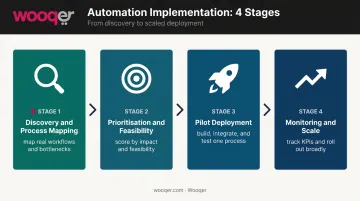
Stage 3 — Pilot Deployment and Workflow Build
Start with one process, one team, or one location. Build or configure the automated workflow using no-code/low-code tools where possible, integrate it with existing systems, train the team, and monitor results before scaling.
Tools like Wooqer's no-code builder make this faster — operations managers can configure drag-and-drop workflows without IT involvement, drawing on pre-built templates across 20 industries. New workflows deploy in minutes, not months.
Stage 4 — Monitoring, Optimization, and Scale
Track KPIs weekly: cycle time, error rates, completion rates, cost per unit. Gather user feedback. Refine the workflow based on data. Then systematically roll successful automation out to additional processes and locations.
This stage never truly ends. Each refinement cycle raises the performance floor for every subsequent automation you introduce.
Top Operations Functions to Automate
The highest-ROI starting points share three characteristics:
- High frequency — repeated daily or weekly across locations
- Error-prone — reliant on human memory or manual handoffs
- Paper- or email-driven — no real-time visibility or audit trail
Compliance, Audits, and Quality Inspections
Automated digital checklists, mobile-captured photo evidence, auto-scoring, and corrective action tracking replace paper audits and manual follow-ups entirely.
A retail chain automating store compliance audits across 200 locations can generate instant reports after each inspection — with GPS verification confirming where and when each audit occurred. The Wooqer Store Audit app has over 14,000 users with consistent 4.8 ratings, enabling 3x faster audits and 40% cost reduction in retail operations.
Inventory and Supply Chain Management
Automation enables real-time stock monitoring with auto-reorder triggers when inventory falls below threshold levels, automated supplier notifications, and predictive demand forecasting.
McKinsey reports AI-powered demand forecasting reduces inventory levels by 20–30%. For a logistics operator with high carrying costs, linking reorder workflows directly to POS data eliminates both stockouts and overstock.
Scheduling, Task Delegation, and Workforce Coordination
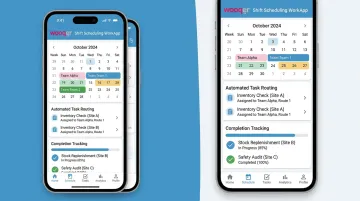
Automated task routing assigns work based on role, availability, and location — removing the manual coordination that slows shift scheduling and work assignment.
Wooqer's Shift Scheduling WorkApp reports 92% completion rates, 59% time saved, and 97% accuracy across implementations. Calendar scheduling delivers tasks to the right people at the right time, with automated notifications closing the loop.
Data Entry, Reporting, and Decision Support
Automated data collection from field teams replaces manual report compilation with real-time performance dashboards. Operations managers stop waiting for submissions and start acting on live data.
When every location feeds data into a single dashboard in real time, managers spot problems hours earlier — not after the weekly report lands in their inbox.
How to Choose the Right Automation Tool for Operations Management
The best tool depends on the type of processes being automated, your team's technical capability, and your scale. Most organizations benefit from a platform that grows with their automation maturity rather than requiring a tool replacement at each stage.
Key Criteria to Evaluate
| Criterion | Why It Matters |
|---|---|
| Mobile-first design | Field teams operate away from desks; desktop-only tools see low adoption |
| No-code/low-code customization | Operations managers should build workflows without IT dependency |
| Multi-location scalability | Single-location tools don't support distributed operations management |
| Offline capability | Field teams in remote or low-connectivity environments can't pause for signal |
| Built-in compliance and reporting | Audit trails and instant reports should be automatic, not add-ons |
| ERP/HR/POS integration | Data must flow into your existing tech stack, not create silos |
For distributed field operations, store audits, or multi-site compliance, look specifically for GPS tracking, photo capture, automated notifications, and role-based access — available out-of-the-box without custom development.
Platforms like Wooqer take this approach: 1,000+ pre-built WorkApps across retail, QSR, manufacturing, logistics, and banking ship with offline capability, GPS tracking, and instant PDF reporting built in. Enterprise teams have deployed across 500+ locations within days of signing up.
Avoiding Common Pitfalls
Knowing what to look for matters as much as knowing what to avoid. Watch for these failure modes when evaluating platforms:
- Requires heavy custom coding for every workflow, creating an IT backlog that slows adoption
- Offers no pre-built templates, so every deployment starts from scratch at high cost
- Delivers dashboards that update daily or weekly — real-time visibility is the whole point
- Lacks offline functionality, which breaks down immediately with any field team
Start with a platform that offers pre-built templates for common operations functions. You can always customize from a working baseline — you can't easily recover from a blank-canvas tool that requires months of development before it's usable.
Frequently Asked Questions
What is automation in operations management?
It's the use of software and technology to execute, monitor, and optimise repeating operational tasks — scheduling, compliance tracking, quality checks, reporting — with minimal manual effort. The goal is consistent outputs, reduced errors, and freed-up team capacity for higher-value work.
What are the 4 stages of automation in operations management?
The four stages are: Discovery and Process Mapping → Prioritization and Feasibility Assessment → Pilot Deployment and Workflow Build → Monitoring, Optimization, and Scale. Each stage builds on the previous — skipping ahead typically produces automation that works for one location but breaks at 50.
What are the 4 types of automation in operations management?
- Task Automation (RPA) — handles rule-based, repetitive tasks
- Workflow Automation — orchestrates multi-step processes across teams
- Intelligent/AI-Powered Automation — makes dynamic decisions from data
- Hyperautomation — integrates all of the above into an organization-wide program
What are the top 5 automation tools for operations management?
- UiPath — enterprise RPA for finance, compliance, and back-office task automation
- Microsoft Power Automate — workflow automation for organizations on the Microsoft 365 ecosystem
- Automation Anywhere — high-volume back-office and shared-services RPA
- ServiceNow — cross-functional enterprise workflow automation and AI orchestration
- Wooqer — mobile-first WorkApp platform for field operations and compliance automation across multi-location enterprises
How do I know which processes to automate first?
Prioritize processes that are high-frequency, currently paper-based or email-driven, and prone to human error. Plot each against business impact and automation feasibility — processes scoring high on both axes deliver the fastest ROI with the least implementation complexity.
If you're ready to see what automation looks like in practice for your operations, Book a Demo to explore how Wooqer's WorkApps can eliminate manual processes across your locations, or Try Wooqer and experience the platform firsthand.