Introduction
Most teams don't fail because they lack ambition. They fail because tasks fall through the cracks — assigned in one chat, forgotten in an email thread, overdue before anyone notices.
If you manage a team across multiple locations, the problem compounds fast. Think of a retail chain running store audits through WhatsApp groups, or a logistics operation tracking compliance on spreadsheets. On a manufacturing floor, accountability can exist only in someone's memory.
Deskless workers make up 70–80% of the global workforce — roughly 2.7 billion people — and most task management tools were never built for them.
I tested 10 task management platforms across different team types — remote knowledge workers, field operations teams, developers, and multi-location retail and logistics environments. Not demos. Actual use.
Here's what I found, including an honest breakdown of where each tool excels and where it falls short, plus a decision framework to help you pick the right one.
Key Takeaways
- Task management software centralizes task creation, assignment, and tracking — replacing scattered emails and spreadsheets
- The right tool depends on your team type: desk-based, field-based, technical, or operational
- Popular tools work well for office teams but fall short for frontline and multi-location operations
- Evaluate tools on mobile access, offline capability, automation depth, and whether pricing is clearly published
- No single tool wins every context; the buyer's guide at the end helps you narrow down your options
What Is Task Management Software and Why It Matters in 2026
Task management software is a digital tool that lets teams create, assign, prioritize, and track work from a centralized system — replacing the spreadsheets, email threads, and verbal follow-ups that cause things to get missed.
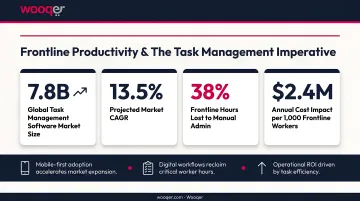
The stakes are higher now than they were three years ago. The global task management software market hit USD 3.94 billion in 2025, driven by distributed operations and rising pressure on operational teams to do more with less. In retail alone, McKinsey reported that losing one frontline employee costs nearly $10,000 on average (in the US). Operational chaos drives that cost — and better task management directly reduces it.
The 10 tools reviewed below cover that full spectrum: agile development platforms, visual project boards, all-in-one productivity suites, and purpose-built field operations platforms. Whatever your team structure looks like, at least one of these is worth a close look.
10 Task Management Software I Tried: Full Reviews
Tools were selected based on actual use across different team types and industries — not just ratings or feature lists.
monday.com
monday.com is a visual work management platform known for its colorful, customizable boards and genuinely low barrier to entry. Kanban, timeline, Gantt, and calendar views are all available, and automation rules cut down on repetitive admin.
It works best for marketing teams and cross-functional project groups running parallel workstreams. The drag-and-drop interface makes onboarding fast, and the template library covers most standard use cases out of the box.
| Attribute | Detail |
|---|---|
| Best For | Visual project planning and cross-functional team coordination |
| Pricing | Free plan (up to 2 seats); paid plans from $9/seat/month (billed annually) |
| Key Limitation | Gantt charts and advanced reporting locked behind higher-tier plans |
G2 Rating: 4.7/5 from 15,416 reviews
ClickUp
ClickUp positions itself as a replacement for multiple tools — combining tasks, docs, goals, and chat in one interface. Its free plan is among the most generous available, with unlimited tasks and real-time collaboration included.
The trade-off: the sheer volume of features creates a steep learning curve. New users often feel lost before finding their rhythm. Strong pick for startups willing to invest setup time.
| Attribute | Detail |
|---|---|
| Best For | Teams seeking a feature-rich free plan with room to scale |
| Pricing | Free plan available; paid plans from $7/user/month (billed annually) |
| Key Limitation | Highly granular customization leads to time-consuming initial setup |
G2 Rating: 4.6/5 from 12,503 reviews
Wrike
Wrike stands out for its intake form logic — custom request forms with conditional routing that automatically send tasks to the right workflow. For teams managing structured, repeatable work (marketing ops, professional services), this alone justifies the tool.
Auto-adjusting task dependencies and built-in proofing tools add further depth for review-heavy workflows. Note that the free plan caps active tasks and subtasks at 200 per account.
| Attribute | Detail |
|---|---|
| Best For | Template-driven teams managing structured, repeatable workflows |
| Pricing | Free plan available; paid plans from $10/user/month (billed annually) |
| Key Limitation | Subtasks capped on free plan; iOS offline access limited to viewing only |
G2 Rating: 4.2/5 from 4,530 reviews
Asana
Asana hits the sweet spot between simplicity and capability. Task dependencies, workload views, and native automation are all accessible without a steep learning curve — which matters more than feature count when you're rolling out to a non-technical team.
Its free plan supports up to 10 users and covers most basic team needs. AI features and advanced reporting require higher-tier plans.
| Attribute | Detail |
|---|---|
| Best For | Cross-functional collaboration and milestone-driven project execution |
| Pricing | Free up to 10 users; Starter from $10.99/user/month (billed annually) |
| Key Limitation | AI features and advanced reporting limited to higher-tier paid plans |
G2 Rating: 4.4/5 from 13,657 reviews
Trello
Trello is the simplest tool on this list — and deliberately so. Cards move across columns, work gets done, nobody needs training. The Butler automation engine adds more capability than Trello's minimal interface suggests.
Where it breaks: anything beyond simple Kanban. No native Gantt chart, limited reporting, and the free plan caps at 10 collaborators per workspace (boards go view-only if exceeded).
| Attribute | Detail |
|---|---|
| Best For | Simple Kanban-based tracking for small teams or individuals |
| Pricing | Free up to 10 collaborators; Standard from $5/user/month (billed annually) |
| Key Limitation | Limited reporting; no native Gantt chart on free plan |
G2 Rating: 4.4/5 from 14,035 reviews
Smartsheet
Smartsheet looks like a spreadsheet and works like a project management platform. For organizations where data-literate teams resist moving away from familiar grid structures, it's an effective bridge.
Gantt charts, Kanban boards, resource management, and automated alerts are all included — though advanced integrations (Salesforce, Jira) require Business plan or higher.
| Attribute | Detail |
|---|---|
| Best For | Scaling organizations needing automation and real-time project visibility |
| Pricing | 30-day free trial; Pro from $9/member/month (billed annually) |
| Key Limitation | Salesforce and Jira connectors locked to higher-tier plans |
G2 Rating: 4.4/5 from 22,164 reviews
Notion
Notion is less a task manager and more a flexible workspace — databases, notes, and task boards coexist in one tool. Teams that want project documentation and task tracking in the same place will find this appealing.
The downside: Notion requires deliberate setup. Without a clear structure imposed from the start, workspaces become disorganized quickly. No native time tracking or workload management either.
| Attribute | Detail |
|---|---|
| Best For | Teams wanting to unify documentation and task management |
| Pricing | Free for individuals; Plus from $10/member/month |
| Key Limitation | Unstructured without deliberate setup; limited native reporting |
G2 Rating: 4.6/5 from 11,929 reviews
Todoist
Todoist is the productivity tool for people who just want a clean to-do list. Natural language input, recurring tasks, and priority labels work well for individuals and small teams. The karma scoring system keeps personal productivity on track.
It's not built for complex team collaboration — reporting is minimal on the free plan (1-week activity history), and it doesn't scale into enterprise workflows.
| Attribute | Detail |
|---|---|
| Best For | Individual productivity and small team task tracking with minimal setup |
| Pricing | Free plan available; Pro from $4/user/month (billed annually) |
| Key Limitation | Limited team collaboration and reporting compared to full-suite platforms |
G2 Rating: 4.5/5 from 826 reviews
Jira
Jira is purpose-built for software development teams running agile workflows. Scrum boards, sprint backlogs, velocity tracking, CI/CD pipeline integrations — it covers the development lifecycle comprehensively.
For non-technical teams, it's the wrong tool entirely. The interface is complex, the terminology assumes familiarity with agile, and the configuration overhead is significant. Use it only if your primary users are developers.
| Attribute | Detail |
|---|---|
| Best For | Agile software development teams managing sprints, bugs, and releases |
| Pricing | Free up to 10 users; Standard from $7.91/user/month |
| Key Limitation | Steep learning curve; not practical outside development contexts |
G2 Rating: 4.3/5 from 7,838 reviews
Wooqer
Every tool reviewed above was designed for desk-based teams. Wooqer is built for everyone else.
Wooqer is a mobile-first WorkApp platform purpose-built for frontline and operational teams — retail chains, QSR restaurants, manufacturing plants, and banking branches among them. It was designed specifically for multi-location operations, not retrofitted from generic project management features.
What makes it different in practice:
- True offline mode: field teams complete tasks without internet; data syncs automatically when connectivity returns
- GPS and location tracking: captures location data at task completion for field verification
- Photo evidence with annotations: embedded directly into checklists, not bolted on as an afterthought
- Auto-scoring and grading: audit results scored automatically and surfaced to managers through real-time dashboards
- SensEye visual AI verifies merchandising compliance from submitted photos — one retail customer moved from 65% to 95% compliance across 80+ stores, cutting VM rollout from weeks to hours
- 1,000+ pre-built WorkApps across 20 industries (Store Audit, Food Safety Checklist, Warehouse Safety Check, Vehicle Inspection) — deployable in minutes without IT involvement
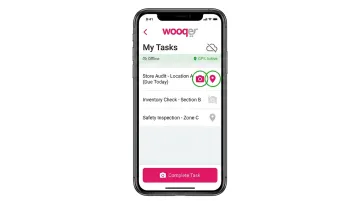
Three distinct roles cover the full operational hierarchy: Producers (app builders), Reviewers (area managers), and Store Teams (frontline users) — each with purpose-built access, free certification training, and role-appropriate dashboards. No per-seat pricing; the enterprise model supports unlimited team members.
| Attribute | Detail |
|---|---|
| Best For | Field operations, multi-location compliance, and frontline task management |
| Pricing | Contact Wooqer; supports unlimited team members |
| Key Advantage | Offline capability, visual AI analytics, mobile-first design, 1,000+ industry WorkApps |
G2 Rating: 4.7/5 from 46 reviews | Capterra: 4.4/5 from 69 reviews
How to Choose the Right Task Management Software for Your Team
The most common mistake: picking a tool based on brand recognition or feature count, then discovering your actual users won't or can't adopt it.
According to Capterra, 34% of U.S. businesses regret a software purchase due to onboarding or training difficulty, and involving end users early in evaluation improves adoption success by 55%. That last point matters more than any feature comparison.
The 5 Factors That Actually Drive the Decision
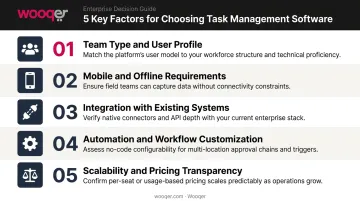
1. Team type and user profile Desk-based knowledge workers and frontline field workers have very different needs. A marketing team needs boards and timelines; a store manager needs mobile-first checklists with offline access. Evaluate tools against both profiles if your workforce spans both.
2. Mobile and offline requirements Most popular platforms assume internet connectivity. If your team works in warehouses, on delivery routes, or in store locations with unreliable WiFi, offline capability is non-negotiable, not optional.
3. Integration with existing systems A task tool that doesn't connect to your ERP, HR platform, or communication stack creates more friction than it removes. Map your critical integrations before shortlisting.
4. Automation and workflow customization Basic task assignment is the baseline. The tools that deliver real ROI are the ones that automate intake routing, trigger notifications, enforce approval chains, and flag non-compliance automatically.
5. Scalability and pricing transparency Per-seat pricing looks affordable at 20 users. At 500 frontline workers across 50 locations, costs become prohibitive. Understand the pricing model at your projected scale, not your current headcount.
A Quick Decision Framework
| If your team is... | Consider... |
|---|---|
| A software development team | Jira |
| A small team or individual | Trello or Todoist |
| A cross-functional project team | Asana or monday.com |
| An all-in-one-tool-seeker | ClickUp or Notion |
| Managing templates and workflows | Wrike or Smartsheet |
| A multi-location operational team | Wooqer |
One practical rule: run your free trial with real tasks from your actual workflow — not demo data. The tool that feels polished in a vendor demo often reveals its limitations fast when handling your real operational complexity.
Conclusion
The best task management tool is not the one with the most features or the highest G2 score. It's the one your team will actually use, consistently, in the conditions they work in every day.
For desk-based teams, monday.com, Asana, and ClickUp are each strong options — the right pick depends on your team's complexity and budget. For developers, Jira remains the standard. For teams forcing field operations into tools designed for offices, the picture is different. Retail chains managing compliance across hundreds of stores, logistics operations tracking tasks without reliable connectivity, QSR brands enforcing food safety standards at scale — these use cases consistently fall outside what office-first platforms were built to handle.
If your team manages tasks across multiple physical locations or depends on frontline workers to complete operational processes, Wooqer's mobile-first WorkApps are worth a look — designed specifically for field operations, with real-time visibility and accountability built in from the start.
Frequently Asked Questions
What is the 1-3-5 rule for tasks?
The 1-3-5 rule is a daily prioritization framework where you commit to completing 1 big task, 3 medium tasks, and 5 small tasks each day. It prevents overloading your schedule while ensuring meaningful progress on what matters most.
What is task management software used for?
Task management software is used to create, assign, prioritize, and track work from a centralized system instead of scattered emails and spreadsheets. It improves accountability, reduces missed deadlines, and gives managers real-time visibility into what's getting done.
How is task management software different from project management software?
Task management focuses on the day-to-day execution of individual work items. Project management covers broader planning: budgets, timelines, and resource allocation. Many modern platforms now offer both, though their depth in each area varies significantly.
What features should I prioritize in task management software for field teams?
Mobile-first design, true offline functionality, GPS location tracking, photo capture, and real-time reporting are the most critical. Most desk-based tools add mobile as an afterthought; for field operations, it needs to be the primary interface.
Can task management tools work without internet access?
Offline capability varies widely. Most desk-based platforms require a live connection. Platforms built specifically for field operations, like Wooqer, work fully offline and sync automatically once connectivity is restored.
What is the biggest mistake teams make when choosing task management software?
Choosing based on brand recognition or feature count rather than fit for the actual end user. This is especially costly when the team includes frontline workers who need simple, mobile-friendly interfaces rather than enterprise platforms designed for desk-based workers.
If your task management challenge spans physical locations with frontline teams who need real accountability and visibility, Book a Demo to see how Wooqer's mobile-first WorkApps solve operational task management at scale, or Try Wooqer and see the difference a purpose-built field platform makes compared to repurposed desk tools.