The good news: digital HACCP tools are no longer reserved for large enterprises with dedicated IT teams. Several platforms now offer free tiers or meaningful free trials, making digitization accessible to businesses of every size.
This article covers the top free HACCP management software of 2026 — what each one offers, how they differ, and how to pick the right one for your operation.
Key Takeaways
- HACCP software digitizes hazard analysis, CCP monitoring, corrective actions, and audit documentation in one place
- "Free" varies by platform — permanent free tiers, time-limited trials, and freemium caps are all different; confirm which type before committing
- Prioritize mobile access, automated alerts, corrective action tracking, and audit-ready reporting when evaluating options
- The tools listed cover audit management, AI-assisted plan building, and mobile-first compliance tracking
- Wooqer is a mobile-first, no-code platform built for food businesses running compliance across multiple locations
What Is HACCP Software — and Why Does It Matter?
HACCP software is a digital platform that helps food businesses develop, implement, and manage Hazard Analysis and Critical Control Points plans — replacing paper logs with traceable, real-time records.
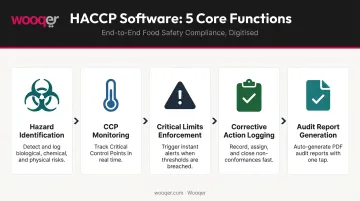
According to the FDA, HACCP is a systematic approach to identifying, evaluating, and controlling food safety hazards across the entire supply chain — from raw material production through distribution and consumption. HACCP software supports every step of that process:
- Identifying biological, chemical, and physical hazards
- Defining and monitoring critical control points (CCPs)
- Setting and enforcing critical limits
- Logging corrective actions when limits are breached
- Generating verification records and audit-ready reports
Manual processes introduce serious compliance risk. USDA estimates put the cost of foodborne illness at $74.7 billion annually — and that figure doesn't account for the brand damage, regulatory penalties, and operational disruption that follow a failed audit or recall.
Those costs hit multi-location operations hardest. For restaurants, QSRs, food manufacturers, and distributors managing multiple sites, consistent execution is nearly impossible without a digital system that gives managers real-time visibility into what's happening on every floor.
Top Free HACCP Management Software of 2026
The tools below were selected based on usability for food service and multi-location operations, depth of HACCP-specific features, and accessibility for teams without dedicated IT support. A quick note on terminology: "free" includes both genuine free tiers (with feature or user limits) and free trials that let you evaluate before paying. Each listing specifies which applies.
SafetyCulture (formerly iAuditor)
SafetyCulture is a cloud-based inspection and audit platform used widely across food service and manufacturing. It offers a free plan for teams of up to 10 users — one of the few genuinely free tiers in this category.
Hundreds of pre-built HACCP checklists are available, and forms can be customized without any technical background. Inspections run on mobile devices including offline, with data syncing automatically when connectivity returns.
| Attribute | Details |
|---|---|
| Free Version | Free plan for up to 10 users; premium starts at $24/seat/month (billed annually) |
| Key Features | Customizable HACCP checklists, real-time reporting, corrective action management, offline access, sensor integrations |
| Platforms | Web, iOS, Android |
Limitation to note: The free plan restricts users to 5 active inspection templates and limits data history. Teams needing broader reporting or more templates will need to upgrade.
Wooqer
Wooqer is a mobile-first operations platform purpose-built for multi-location food businesses — restaurants, QSRs, and food chains managing compliance across dozens or hundreds of sites. The platform offers free access to get started, with HACCP-ready WorkApps deployable in minutes without IT involvement.
The food safety WorkApp library includes:
- Food safety checklists covering HACCP compliance and hygiene verification with photo evidence
- Refrigerator and freezer temperature logs with trend analytics (16,000+ users, 97% accuracy)
- Kitchen hygiene audits for sanitation and cleanliness standards
- Staff hygiene checks for personal hygiene and handwashing compliance
- Allergen management tracking to document and prevent cross-contamination
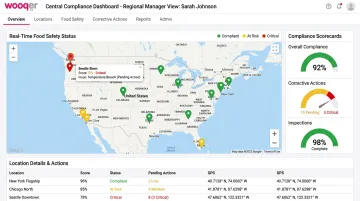
Every WorkApp comes with auto-scoring, corrective action tracking, GPS location tagging, role-based access, and instant PDF reports. Frontline staff log data on any mobile device; regional managers get real-time compliance status across all locations from a central dashboard.
Chai Point, India's largest chai retail chain, deployed Wooqer across 180+ outlets and achieved 98% food safety compliance while reducing quality incidents by 80%.
| Attribute | Details |
|---|---|
| Free Version | Free to get started; supports unlimited team members with no per-seat cost barrier |
| Key Features | Customizable WorkApps, corrective action tracking, instant PDF reports, trend analytics, GPS tracking, offline capability, role-based access, calendar scheduling |
| Platforms | Web, iOS, Android — works on any device |
Zip HACCP
Zip HACCP is a food safety compliance tool designed for small to mid-size food service businesses. The platform offers a free demo to evaluate before committing — note that a formal free trial is not verified on the official site.
Its appeal is simplicity. Frontline teams can start completing digital HACCP checklists quickly, with Bluetooth thermometer integration removing the need for manual temperature entry. Task tracking syncs across devices in real time, and remote managers can monitor compliance without being on-site.
| Attribute | Details |
|---|---|
| Free Version | Free demo available; paid plan at $59.99/location/month (plus $200 one-time for Zip HACCP Probe) |
| Key Features | Digital food safety checklists, Bluetooth temperature probe integration, real-time reporting, remote task tracking, mobile app |
| Platforms | iOS and Android |
FoodDocs
FoodDocs is an AI-powered food safety platform that generates HACCP plans automatically. It offers a 14-day free trial, no credit card required — useful for businesses that need to build a compliant HACCP plan quickly without starting from scratch.
The AI HACCP plan builder is the headline feature: input your food business type and processes, and the system generates a customized plan, monitoring checklists, and temperature logging setup. For small operators without a dedicated food safety manager, this significantly reduces the time and expertise needed to get compliant.
| Attribute | Details |
|---|---|
| Free Version | 14-day free trial, no credit card required; paid plans from $167/month (billed annually) |
| Key Features | AI HACCP plan builder, digital monitoring checklists, temperature logging, task management, automated report generation |
| Platforms | Web, iOS, Android |
Rating: 4.9/5 on Capterra across 28 reviews (as of June 2026).
Effivity
Effivity is a web-based food safety management system that supports HACCP alongside ISO 22000 compliance. It offers a 15-day free trial, no credit card required — and is best suited for businesses targeting multiple certification standards at once.
The platform covers a broader compliance scope than most tools in this list: hazard control, prerequisite program (PRP) management, supplier selection and approval, recall management, and risk management are all included in a single system.
| Attribute | Details |
|---|---|
| Free Version | 15-day free trial, no credit card required; subscription plans from $29/month |
| Key Features | HACCP hazard control module, PRP management, supplier selection and approval, recall management, ISO 22000 compliance |
| Platforms | Web (accessible via laptop, tablet, and mobile) |
Rating: 4.6/5 on Capterra across 56 reviews (as of 2026).
What to Look for in Free HACCP Management Software
The most common mistake buyers make: choosing based on price alone. A tool that's free but lacks corrective action workflows, multi-location support, or mobile access will cost you more in the long run: either a forced upgrade or a disruptive tool switch mid-implementation.
Must-Have Features
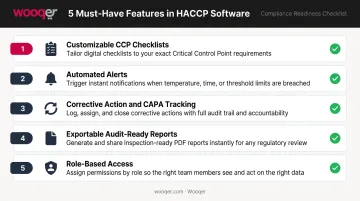
Every HACCP tool, regardless of cost, should cover these five functions — all of which map directly to the FDA's seven HACCP principles:
- Customizable CCP checklists that reflect your specific processes, not generic templates
- Automated alerts when a critical limit is breached, with immediate team notification
- Corrective action and CAPA tracking in a closed loop: assign, track, and verify resolution
- Exportable audit-ready reports that hold up during regulatory inspections
- Role-based access separating frontline data entry from manager review and sign-off
Mobile-First and Offline Capability
Food safety monitoring happens on the kitchen floor, in cold storage, and in the field — not at a desk. Tools that require desktop access, or that lose data when connectivity drops, are impractical for frontline teams. Platforms like SafetyCulture and Wooqer are built for mobile-first, offline-capable use, with data syncing automatically once a connection is restored.
Free-Tier Limitations to Evaluate Before Committing
These aren't dealbreakers — but they're checkpoints. Before committing to a free plan or trial, verify:
- Does the free tier support your full team, or does it cap user count?
- How many active checklists or templates are allowed?
- Can you monitor more than one location without upgrading?
- How long is compliance history stored before it's purged?
- Are audit-ready exports available on the free tier, or paywalled?
Run through this list before signing up — free tiers vary widely, and discovering a hard limit after onboarding your team wastes time you don't have.
How We Chose These Tools
Tools were evaluated against the following criteria:
- Availability of a genuine free tier or meaningful free trial — enterprise-only platforms with no accessible entry point were excluded
- Mobile accessibility — tools requiring desktop-only use were deprioritized
- Ease of setup without IT involvement — relevant for food operators without dedicated technical teams
- Core HACCP feature coverage — CCP monitoring, corrective action tracking, and audit report generation were non-negotiable
- Suitability for multi-location food operations — since compliance gaps most often appear when standards drift between sites
Pricing transparency, user ratings from Capterra and G2, and verified real-world use in food service or manufacturing contexts informed the final selection. SafetyCulture carries a 4.6/5 rating across 354 Capterra reviews; FoodDocs holds a 4.9/5 across 28 reviews (both as of June 2026).
Conclusion
Free HACCP management software has made digital compliance genuinely accessible — but the right tool still depends on your team size, number of locations, and how complex your food safety program is.
Before committing to any platform, run a free trial with these priorities in mind:
- Test mobile usability with your actual frontline team
- Walk through corrective action workflows end to end
- Confirm the tool can scale as your locations grow — adoption gaps kill compliance value faster than any paperwork failure
For food businesses managing compliance across multiple locations, Wooqer's mobile-first WorkApps are worth evaluating. Pre-built HACCP checklists, real-time corrective action tracking, and instant audit reports deploy in minutes — no paper, no complex setup required.
Frequently Asked Questions
What is HACCP software?
HACCP software is a digital platform that helps food businesses develop, implement, and manage Hazard Analysis and Critical Control Points plans. It replaces manual paper records with traceable, real-time monitoring, corrective action tracking, and audit-ready documentation.
What are the 7 principles of HACCP?
The FDA defines seven principles for HACCP compliance:
- Conduct a hazard analysis
- Identify critical control points
- Establish critical limits
- Establish monitoring procedures
- Establish corrective actions
- Establish verification procedures
- Establish record-keeping and documentation systems
What is F&B software?
F&B software refers to digital tools that help food and beverage businesses manage operations — covering food safety compliance, inventory, production scheduling, supplier management, and quality assurance. HACCP software is a specialized subset focused on food safety management.
Is HACCP software really free, or are there hidden costs?
Most "free" plans are either freemium tiers with capped users or features (SafetyCulture, for example, limits its free plan to 10 users) or time-limited trials. Before committing, check what's gated behind paid plans — particularly reporting depth, multi-site support, and user limits.
Can HACCP software work offline or on mobile devices?
The best platforms are mobile-first and support offline data capture — critical for frontline teams on the floor or in the field. SafetyCulture and Wooqer both offer offline functionality, with data syncing automatically once connectivity is restored.
For food businesses looking to move beyond paper HACCP logs and build a genuinely audit-ready compliance system, Book a Demo to see how Wooqer's food safety WorkApps work across multiple locations, or Try Wooqer and get your HACCP checklists running digitally from day one.