No-code AI app builders change that equation entirely. Drag-and-drop interfaces, AI-generated layouts, and pre-built templates mean a store manager in Mumbai or a logistics coordinator in Delhi can launch a working compliance app in an afternoon — no IT team required.
This guide covers 9 no-code AI app builders tested and compared for 2026, with a clear breakdown of what each does best, its standout AI feature, and current pricing — so you can choose the right platform without rebuilding from scratch six months later.
Key Takeaways
- No-code AI app builders let non-technical users build and deploy apps through visual interfaces and AI prompts — zero coding required.
- Best tool depends on use case: general web apps, field operations, enterprise data workflows, or lightweight automation.
- Key criteria: ease of use, AI depth, offline support, mobile readiness, integrations, and pricing model.
- Covers general-purpose builders (Bubble, Softr, FlutterFlow) and purpose-built platforms (Wooqer for field ops, AppSheet for spreadsheet-driven workflows).
- Pricing ranges from $5/user/month to $199/month; Wooqer uses custom annual licensing.
What Is a No-Code AI App Builder?
A no-code AI app builder is a platform that lets users create functional applications through visual interfaces, drag-and-drop editors, pre-built templates, and conversational AI prompts — without writing a single line of code.
Users define a database structure, design the UI, and configure app logic — all visually. The AI layer then accelerates that process: generating layouts from text prompts, suggesting workflows, or analysing data in real time.
No-code vs. low-code — a quick distinction:
- No-code: Fully visual, zero programming required. Anyone can build.
- Low-code: Visual-first, but allows optional custom scripting for users with some technical background.
This list focuses on true no-code platforms. Where a tool crosses into low-code territory (FlutterFlow, Bubble at advanced tiers), that's noted clearly.
That distinction matters more than it used to. Forrester now describes this evolution as "AppGen" — AI/ML automating application creation, editing, and release — which means the line between "builder" and "developer" keeps moving. Knowing which category a tool sits in helps you pick the right one.
9 Best No-Code AI App Builders in 2026
These platforms were selected based on five criteria: AI capability, ease of use, mobile readiness, scalability, and fit for real business workflows. Each entry covers what the platform does best, its standout AI feature, and current pricing.
Wooqer
Wooqer is a mobile-first, AI-powered no-code platform built specifically for digitising field operations, audits, inspections, and compliance workflows. It serves retail, QSR, manufacturing, logistics, pharma, banking, and hospitality — with over 1,000 pre-built WorkApps across 20+ industry categories, including 500 dedicated to retail alone.
Unlike general app builders, Wooqer is purpose-built for multi-location enterprises where frontline accountability, real-time visibility, and offline capability are non-negotiable.
Standout features:
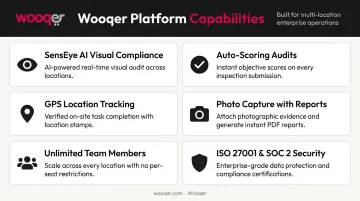
- SensEye AI validates merchandising displays from store team photos — one customer cut VM implementation time from weeks to hours and hit 95% VM compliance
- Auto-scoring and grading across audit and inspection WorkApps
- GPS and location tracking embedded in dozens of WorkApps, from fuel logs to monthly security checks
- Photo capture with annotations, offline capability, and instant PDF reports
- Unlimited team members with no per-seat pricing — critical at 50K+ location scale
- ISO 27001 certified and SOC 2 Type II compliant, with AES-256 encryption and MFA
Wooqer's App Marketplace means most teams can go live in minutes rather than building from scratch. The platform has achieved a 4.7-star rating on both the App Store and Google Play.
| Attribute | Details |
|---|---|
| Best For | Field operations, compliance, audits, and multi-location businesses in retail, QSR, manufacturing, and logistics |
| Key AI Feature | SensEye AI for visual compliance verification, plus auto-scoring and trend analytics |
| Pricing | Custom annual licensing — no per-seat fees; request pricing or book a demo at wooqer.com |
Glide
If your team already lives in spreadsheets, Glide is one of the fastest ways to put a proper app interface on top of that data. It connects to Google Sheets, Excel, Airtable, BigQuery, and PostgreSQL — turning existing data into polished, mobile-friendly business apps.
Native AI actions handle text generation, image-to-text, and audio-to-text directly inside the workflow builder. Apps are web-based and can be installed on mobile by adding to the home screen — no app store submission required.
| Attribute | Details |
|---|---|
| Best For | Building mobile-friendly business apps from existing spreadsheet data |
| Key AI Feature | Native AI actions including image-to-text and audio-to-text built into the workflow builder |
| Pricing | Free plan available; Business plan at $199/month (billed annually) |
Bubble
Bubble is a full-stack no-code platform supporting both front-end design and back-end functionality — popular with no-code agencies and SaaS builders who need granular control. It's the most powerful general-purpose builder on this list, with over 6 million builders and 7 million+ apps created across 220+ countries.
Its AI app generator produces working interfaces, database structures, and basic logic from a text prompt. Native mobile apps (iOS and Android) are in public beta.
| Attribute | Details |
|---|---|
| Best For | Full-stack web apps, MVPs, and SaaS products requiring complex logic |
| Key AI Feature | AI generator that produces interfaces, database structures, and logic from text prompts |
| Pricing | Free plan available; Starter at $59/month (billed annually) |
Softr
For teams with no technical background, Softr is the most accessible builder on this list. It creates client portals, dashboards, internal CRMs, and tools on top of Airtable, PostgreSQL, MySQL, and SQL Server — without touching a database directly.
The AI Co-Builder generates app design, database structure, and business logic from a plain-text description. A built-in AI assistant can answer questions based on connected data sources, making it useful for teams that want interactive internal tools fast.
| Attribute | Details |
|---|---|
| Best For | Complete beginners building portals, dashboards, or internal tools |
| Key AI Feature | AI Co-Builder generates app UI and logic, plus in-app AI assistant powered by connected data |
| Pricing | Free plan available; Basic at $49/month (billed annually) |
Airtable
Airtable has evolved from a spreadsheet-database hybrid into a full AI-native app platform. It's built for data-heavy enterprise use cases — teams that need to build internal tools and automations on top of large structured datasets.
Omni, Airtable's conversational AI assistant, builds apps from natural language prompts, analyzes data, and can create and update records. The platform supports AI models from OpenAI, Gemini, Llama, and Anthropic. The Team plan supports up to 50,000 records per base, with Business scaling to 125,000.
| Attribute | Details |
|---|---|
| Best For | Data-driven enterprise app building with AI agents and workflow automation |
| Key AI Feature | Omni conversational AI builder plus embedded agents that operate across thousands of records |
| Pricing | Free plan available; Team at $20/user/month (billed annually) |
Appy Pie
Appy Pie supports both drag-and-drop building and natural language prompts, covering a broad range of app types — mobile apps, websites, and chatbots. Over 10 million businesses have used the platform.
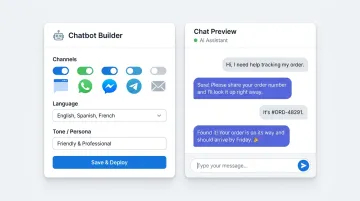
Its chatbot builder (branded Flozic) trains conversational agents on PDFs, URLs, and knowledge bases, with support for 100+ languages and deployment to web, WhatsApp, and Slack. The AI assistant guides development decisions throughout the build process.
| Attribute | Details |
|---|---|
| Best For | Building mobile apps and deploying AI chatbot agents for sales, support, or operations |
| Key AI Feature | AI chatbot builder with multi-LLM support and deployment across web, WhatsApp, and Slack |
| Pricing | 7-day free trial; Basic at $16/app/month (billed annually) |
Zapier Interfaces
Zapier Interfaces is a no-code form and webpage builder with automation at its core — connecting to 9,000+ apps through Zapier's existing engine. It's not trying to be a full app platform; it's the right tool for lightweight use cases like lead capture forms, internal portals, and AI chatbot embeds.
The built-in AI chatbot can be embedded in pages and connected to Zapier's automation triggers, making it a good fit for HR, sales, and marketing teams who want fast results without API complexity.
| Attribute | Details |
|---|---|
| Best For | Building automated forms, lead capture tools, and lightweight internal portals |
| Key AI Feature | Embedded AI chatbot builder with automation triggers across 9,000+ app integrations |
| Pricing | Free plan available; Professional at $19.99/month (billed annually) |
FlutterFlow
FlutterFlow lets users build apps for Android, iOS, web, and desktop from a single project — using 200+ pre-designed UI elements and a visual logic editor. It sits at the boundary between no-code and low-code: non-technical users can build production-quality apps, but custom code extension is available for those who want it.
AI features include Image to Component and Prompt to Component generation directly in the design canvas. Source code and APK download are available on paid tiers — useful for teams that want to own their output.
| Attribute | Details |
|---|---|
| Best For | Cross-platform app development for Android, iOS, and web from a single codebase |
| Key AI Feature | AI-assisted component and widget generation within the visual design canvas |
| Pricing | Free plan available; Basic at $29.25/month (billed annually) |
AppSheet
AppSheet (by Google) converts spreadsheets and databases into fully functional mobile apps, with deep offline support, GPS, barcode scanning, and camera capture built in. For enterprises already running on Google Workspace, the integration is seamless.
Gemini for App Creation lets paid users describe a business process and receive a working app in return. Apps store data locally for offline use and sync when connectivity returns — making it reliable for field teams in low-connectivity environments.
| Attribute | Details |
|---|---|
| Best For | Enterprise field teams needing offline-ready mobile apps from Google Sheets or database data |
| Key AI Feature | Gemini-powered app generation from existing spreadsheet data with predictive features |
| Pricing | Build and test free for up to 10 users; Starter at $5/user/month |
How We Chose the Best No-Code AI App Builders
Each platform was assessed against criteria that reflect real business needs — not just feature checklists.
Core evaluation factors:
- AI capability — depth of built-in AI vs. dependency on third-party API connections
- Ease of use — how quickly a non-technical user can go from sign-up to a working app
- Mobile-first readiness — offline support, native device integration (GPS, camera, barcode), and responsive design
- Scalability — whether the app can grow with the business without requiring a rebuild
- Integration options — compatibility with tools already in use across the organization
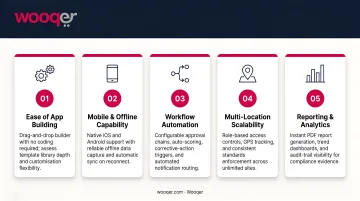
Those criteria reveal an important split. General-purpose builders like Bubble and Airtable serve product teams, agencies, and internal tool builders well. Platforms like Wooqer and AppSheet are purpose-built for field operations, compliance management, and multi-location oversight.
Choosing the wrong category is a common and costly mistake. General-purpose platforms require weeks of custom configuration to replicate what specialized tools deliver out of the box:
- Offline sync for field teams without reliable connectivity
- Auto-scoring and grading on audits and inspections
- Corrective action workflows with clear ownership
- GPS tagging and location-based evidence capture
Without these capabilities pre-built, the app rarely survives contact with operational reality — and rebuilding from scratch is the usual outcome.
Conclusion
No-code AI app builders now handle nearly any business process — customer portals, compliance audits, inventory checks, staff training — can be digitized without a single developer. But the right platform depends on what you're actually building.
When evaluating tools, prioritize:
- Your team's technical comfort level
- Mobile and offline requirements for field use
- Industry-specific workflow needs
- Long-term scalability, not just day-one simplicity
For operations teams in retail, QSR, manufacturing, logistics, or any sector with frontline teams across multiple locations, the comparison narrows quickly. General-purpose builders require significant configuration to handle offline audits, visual compliance checks, corrective action tracking, and GPS-tagged inspections at scale.
Wooqer's WorkApps address that gap directly. The platform is built around mobile-first field use: offline capability, GPS-tagged inspections, photo capture, corrective action tracking, and auto-scored audits — all deployable without IT involvement. With 1,000+ pre-built WorkApps across 20+ industries and an unlimited-user pricing model, it scales across locations without per-seat cost penalties.
Try Wooqer or book a demo to see how WorkApps can digitize your field operations without involving your IT team.
Frequently Asked Questions
What is a no-code AI platform?
A no-code AI platform lets users build AI-powered applications through visual interfaces, drag-and-drop components, and prompt-based builders — with no programming knowledge required. The AI layer handles tasks like layout generation, workflow automation, or real-time data analysis directly within the app.
What is the difference between no-code and low-code AI app builders?
No-code platforms are fully visual — zero programming required, accessible to any non-technical user. Low-code platforms add optional custom scripting for users with some technical background who want finer control over behavior or integrations.
Can I build a mobile app without coding using these tools?
Yes. Platforms like Glide, AppSheet, FlutterFlow, and Wooqer are specifically designed for mobile app creation without coding. Most also support offline use and native device features like GPS, camera, and barcode scanning.
Which no-code AI app builder is best for field operations teams?
Wooqer and AppSheet are purpose-built for field operations, offering offline capability, GPS tracking, photo capture, and real-time reporting. General-purpose builders can replicate some of this, but usually require weeks of custom configuration to reach comparable functionality.
Are no-code AI app builders secure enough for enterprise use?
Leading platforms offer enterprise-grade security, including data encryption, role-based access controls, and compliance certifications. Wooqer, for example, is ISO 27001 certified and SOC 2 Type II compliant. For regulated industries — healthcare (HIPAA), finance (SOC 2), or pharma (GMP) — confirm platform-specific certifications before signing a contract.
How much does it cost to build an app with a no-code AI platform?
Most platforms offer free plans for prototyping. Paid plans across this list range from US$5/user/month (AppSheet) to US$199/month (Glide Business), making no-code significantly more affordable than the US$90,780 average cost of traditional custom app development.
If your field operations team needs apps that work offline, capture GPS-tagged evidence, and enforce compliance standards across multiple locations, Book a Demo to see how Wooqer's purpose-built WorkApps compare to general no-code tools, or Try Wooqer and get a field-ready app deployed without writing a single line of code.