The right SOP software doesn't just store documentation. It ensures procedures are actually followed, tracked, and updated — whether your team is on a retail floor, factory line, or field site with no Wi-Fi.
This guide covers the best SOP creation and management tools in 2026, what to look for before choosing, and which tool fits which use case.
Key Takeaways
- SOP management software replaces paper-based systems with centralized, trackable digital workflows for creating, distributing, and monitoring procedures.
- The best 2026 tools go beyond document storage — they enforce compliance, provide real-time visibility, and support mobile field teams.
- Top picks: Wooqer for multi-location compliance, SafetyCulture for safety audits, Tango for workflow capture, Scribe for quick documentation, Process Street for checklist workflows.
- Key buying criteria: mobile accessibility, offline capability, version control, role-based access, and completion tracking.
- Match the tool to your team — desk-based or field-based, documentation needs or compliance enforcement.
What Is SOP Management Software?
SOP management software is a digital platform for creating, distributing, tracking, and updating standard operating procedures. It replaces paper records, email chains, and static Word documents with centralized, auditable workflows that teams can access anywhere.
Two distinct capability tiers are worth separating:
- SOP creation tools focus on building step-by-step documentation quickly — auto-capturing workflows, generating guides, providing templates.
- SOP management platforms go further — they enforce adherence, track completion, trigger corrective actions, and generate audit reports.
Operations-heavy businesses need both functions in one tool.
Demand for mobile-first SOP solutions has grown steadily in industries like retail, QSR, manufacturing, and logistics. Yet access gaps remain significant: a 2024 Zebra Technologies/Coresight Research survey found that roughly one-third of U.S. retail workers — approximately 7.7 million employees — lack a dedicated mobile device. Among large retailers, 40% of store-operations staff either share a device or go without one entirely.
That makes device accessibility a practical evaluation criterion — not just a nice-to-have feature — when selecting an SOP platform.
Best SOP Creation & Management Software in 2026
These five tools were evaluated across ease of SOP creation, compliance tracking, mobile accessibility, multi-location support, scalability, and user adoption — covering use cases from field operations to desk-based documentation.
Wooqer
Wooqer is a mobile-first, AI-powered operations platform built for multi-location enterprises in retail, QSR, manufacturing, banking, and logistics. Operations teams digitize SOPs into customizable WorkApps that run on any device — including offline in the field.
What separates Wooqer from other tools on this list is its purpose-built design for frontline teams at scale. This isn't a document library with a mobile wrapper. Wooqer delivers real-time compliance visibility across every location, with GPS verification, photo capture with annotations, auto-scoring, corrective action tracking, and instant PDF reports generated on completion.
The results from live deployments are concrete:
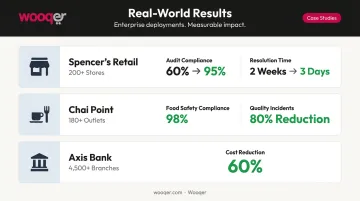
- Spencer's Retail rolled out Wooqer across 200+ stores in six weeks, lifting audit compliance from 60% to 95% and cutting issue resolution time from two weeks to three days
- Chai Point achieved 98% food safety compliance across 180+ outlets and reduced quality incidents by 80%
- Axis Bank standardized operations across 4,500+ branches with a 60% cost reduction
The platform's AI-powered SensEye technology takes compliance a step further — automatically verifying visual merchandising execution through photo analysis. Lifestyle Stores reported VM rollout time dropping from weeks to hours, with compliance improving from 65% to 95% across 80+ stores.
Wooqer supports three role-based tracks — Producers (who build and configure WorkApps), Reviewers (area and regional managers monitoring compliance), and Store Teams (frontline executors) — creating a structured loop from SOP creation to completion verification. Multi-Level Review and Approval (MLRA) workflows handle escalation automatically.
With 450+ enterprise customers managing 50,000+ locations and 1M+ tasks completed daily, Wooqer is the only tool on this list built from the ground up for field operations compliance — not adapted from a desk-based documentation tool.
| Feature | Details |
|---|---|
| Key Features | Customizable WorkApps, SensEye AI analytics, offline mobile access, GPS & location tracking, photo capture with annotations, corrective action tracking, MLRA workflows, auto-scoring, automated notifications, instant PDF reports, calendar scheduling |
| Pricing | Contact Wooqer for pricing; supports unlimited team members |
| Best For | Multi-location enterprises in retail, QSR, manufacturing, logistics, and pharma needing real-time SOP compliance and field audit capabilities |
SafetyCulture
SafetyCulture is a compliance and operations platform used across safety-critical industries — offering digital checklists, SOP templates, and audit tools that flag deviations in real time.
Its standout features for regulated environments include a strong audit trail, asset monitoring for vehicles and equipment, and lone worker monitoring with panic alerts and automated escalation. The Heads Up announcement feature and built-in training module round out its compliance toolkit. Over 76,000 organizations have used SafetyCulture, with more than 50 million inspections completed across 80+ countries.
The mobile app supports offline use across inspections, actions, assets, documents, and training — making it viable for field deployments. It's particularly well-suited for organizations where regulatory compliance and safety SOP adherence are the primary concern.
| Feature | Details |
|---|---|
| Key Features | Premade SOP templates, digital checklists, asset monitoring, training module, offline access, lone worker monitoring, team announcements |
| Pricing | Free plan (up to 10 users); Premium at $24/seat/month billed annually |
| Best For | Safety-driven industries (construction, manufacturing, healthcare) requiring audit-ready SOP compliance |
Tango
Tango is a workflow documentation tool that captures processes automatically as users click through tasks — generating structured step-by-step guides with annotated screenshots, without writing a single line from scratch.
Key differentiators include its browser extension auto-capture, Guide Me interactive walkthroughs that overlay instructions directly in live applications, contextual Nuggets that surface SOPs inside the tools where work happens (Salesforce, Oracle, Workday), and step-level analytics showing where users drop off or struggle.
Tango is browser and desktop-focused — there's no field or offline operations positioning in the product. Its strength is documentation speed and in-context guidance for software workflows.
| Feature | Details |
|---|---|
| Key Features | Auto-capture workflow documentation, in-app guidance overlays, contextual Nuggets, workflow branching, screenshot annotations, shareable guides, step-level analytics |
| Pricing | Free plan available; paid plans from $15/user/month (billed annually) |
| Best For | Ops, IT, and enablement teams documenting software workflows and onboarding processes for desk-based employees |
Scribe
Scribe is an AI-powered process documentation tool that records workflows and instantly generates shareable step-by-step guides — designed for teams that need fast, lightweight SOP creation with minimal setup.
Notable differentiators: the free plan includes unlimited guide creation, Scribe Sidekick lets users reference SOPs in-context while completing a task, sensitive data redaction handles PII and PHI automatically on Enterprise plans, and guides export to PDF, HTML, Markdown, Word, and Confluence. Version history is included on paid plans.
Scribe is browser and web-app focused. Unlike field-facing tools, it's built for desk-based documentation workflows.
| Feature | Details |
|---|---|
| Key Features | AI auto-capture, screenshot annotations, Scribe Sidekick, SOP templates, version history, embed/export options (PDF, HTML, Markdown, Confluence) |
| Pricing | Free plan available; Team plan starts at $12/additional seat/month — verify current pricing at scribe.com/pricing |
| Best For | Small to mid-sized teams needing quick, browser-based SOP documentation with minimal setup |
Process Street
Process Street is a workflow and checklist management platform that turns SOPs into trackable, recurring operational procedures — with task assignments, approval gates, and completion tracking built in.
Its strongest feature for compliance use cases is conditional logic: workflows branch based on user inputs, routing tasks to the right people and triggering the appropriate next steps automatically. Recurring checklist runs handle repeatable processes like weekly audits, employee onboarding, or monthly compliance reviews automatically. Integrations with Slack, Salesforce, Zapier, Microsoft Teams, and 5,000+ apps via Zapier give it strong connectivity for operations teams already using other tools.
iOS and Android apps are included on all plans; offline support is not documented in available product materials.
| Feature | Details |
|---|---|
| Key Features | Conditional logic, recurring workflow runs, approval gates, completion tracking, SOP templates, integrations (Slack, Salesforce, Zapier), role-based permissions |
| Pricing | Contact for pricing; third-party sources indicate paid plans start at approximately $100/month — verify at process.st/pricing |
| Best For | Operations teams managing recurring compliance workflows, onboarding sequences, and multi-step approval processes |
How to Choose the Right SOP Software
The Five Evaluation Dimensions
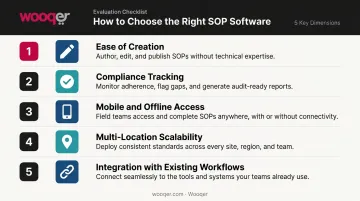
Most teams pick SOP software based on how easy it is to build documentation — then realize too late the tool can't enforce or monitor what gets deployed. Before committing, evaluate across all five dimensions:
- Ease of creation — How quickly can you build or update an SOP? Auto-capture tools like Tango and Scribe win here for desk workflows.
- Compliance tracking — Can managers see who completed what, when, and how accurately? This separates documentation tools from management platforms.
- Mobile and offline access — If frontline workers can't access SOPs on a mobile device without Wi-Fi, the SOPs won't be followed. The Microsoft Work Trend Index found one-third of frontline workers lack proper technological tools to be effective.
- Multi-location scalability — Can you filter, compare, and act on compliance data by region, location, or team?
- Integration with existing workflows — Does the tool connect with the systems your teams already use?
Why These Factors Drive Real-World Adoption
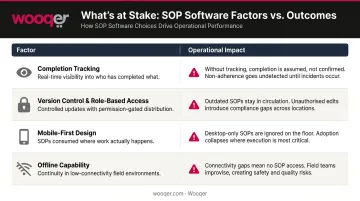
Each dimension above maps directly to an operational outcome. Here's what's at stake if you get it wrong:
| Factor | Why It Matters |
|---|---|
| Completion tracking & real-time visibility | Enables faster corrective action before issues escalate |
| Version control & role-based access | Prevents unauthorized changes; protects against regulatory violations |
| Mobile-first design | Directly drives adoption among frontline workers without desktop access |
| Offline capability | Ensures procedures are followed in warehouses, field sites, and areas with poor connectivity |
The Adoption Test
The best SOP tool is the one your team will actually use. If creating an SOP takes too long, teams skip it. If the access mechanism doesn't fit the work environment — no offline support for field staff, no mobile app for store associates — even a well-written SOP gets ignored. The tool has to fit how work actually happens, not how it happens at a desk.
Conclusion
The right choice comes down to three questions: Where do your teams work? What do you need more — documentation speed or compliance enforcement? Are you managing one location or many?
Tango and Scribe are excellent for desk-based teams that need SOPs built fast. SafetyCulture fits safety-critical environments with regulatory audit requirements. Process Street handles recurring compliance workflows well. None of them are purpose-built for field teams at multi-location scale.
For organizations managing distributed field operations — retail chains, QSR networks, manufacturing plants, logistics operations — Wooqer's mobile-first WorkApps deliver SOP compliance where it matters most: on the frontline, in real time, with GPS verification and photo evidence logged at every step. Setup is fast, adoption is high, and the platform scales across locations without per-seat pricing limits.
To see how Wooqer handles SOP compliance across your specific industry and locations, request a demo or explore the WorkApp marketplace.
Frequently Asked Questions
What is SOP management software?
SOP management software is a digital platform used to create, distribute, track, and update standard operating procedures. It replaces paper-based systems with centralized, auditable workflows that ensure consistent execution across teams and locations.
What is the best SOP management software?
The best tool depends on the use case. For multi-location field operations and compliance enforcement, Wooqer leads. Tango and Scribe excel at fast documentation for desk-based teams, SafetyCulture suits safety-critical environments, and Process Street fits recurring checklist-driven workflows.
What features should I look for in SOP software?
Prioritize ease of creation, mobile and offline access, version control, role-based permissions, completion tracking, and compliance audit trails. Field-heavy businesses should additionally look for GPS tracking, photo evidence capture, and real-time multi-location dashboards.
What is the difference between SOP creation and SOP management software?
Creation tools focus on building documentation quickly — auto-capture, templates, editing. Management platforms go further: enforcing adherence, tracking completion, triggering corrective actions, and generating audit reports. Most modern platforms combine both, but management depth — especially around enforcement and reporting — is where they differ most.
Can SOP software work for field teams and multi-location businesses?
Yes, but most popular tools — Notion, Confluence, Tango, Scribe — are designed for desk-based use. Distributed field teams need mobile-first platforms with offline capability, real-time location tracking, and multi-location compliance dashboards. Wooqer is purpose-built for these requirements.
How often should SOPs be reviewed and updated?
OSHA's Process Safety Management standard requires annual certification that procedures are current. Review at minimum once a year — or immediately when a process, tool, regulation, or org structure changes. Good SOP software makes updates instant and auto-notifies affected team members.
For organizations that need SOPs to be followed, not just filed, Book a Demo to see how Wooqer enforces SOP compliance in real time across distributed field teams, or Try Wooqer and turn your first standard operating procedure into a trackable, mobile-ready WorkApp.